
Building the Foundation — Talos, Nodes, and Cilium
Every Kubernetes cluster starts with a choice of operating system. Most guides reach for Ubuntu Server and kubeadm — a general-purpose OS with Kubernetes installed on top. It works, but it carries an assumption you will SSH into your nodes, install packages, edit files, and maintain a general-purpose Linux system alongside your cluster. Over time, that OS layer accumulates drift: an apt upgrade here, a stale config file there. Reproducing any given node becomes an exercise in archaeology.
I did not want to manage seven operating systems. I wanted to manage one cluster.
This post covers three layers of that foundation: bootstrapping Talos Linux via Omni, organizing nodes into labeled zones, and replacing Flannel with Cilium for eBPF-based networking. By the end, the cluster has a working Container Network InterfaceThe plugin contract Kubernetes uses to give pods networking. Cilium is Frank's CNI; swapping it changes how every packet in the cluster is handled. with L2 LoadBalancer and Hubble observability — the substrate everything else builds on.
    flowchart LR
  subgraph L0[Management — raspi-omni]
    Omni[Omni API]
    Patches[Config Patches<br/>scheduling, labels, extensions]
  end
  subgraph L1[Layer 1 — Talos Machine Config]
    Config[Talos<br/>Machine Config]
  end
  subgraph Nodes[Booted Nodes]
    CP[mini-1/2/3]
    GPU[gpu-1]
    Edge[pc-1, raspi-1/2]
  end
  subgraph L2[Layer 2 — Cilium]
    Cilium[eBPF CNI]
    L2LB[L2 LoadBalancer<br/>192.168.55.200-254]
    Hubble[Hubble UI<br/>192.168.55.202]
  end

  Omni -->|applies| Config
  Patches --> Config
  Config -->|boots| CP
  Config -->|boots| GPU
  Config -->|boots| Edge
  Cilium -->|network| CP
  Cilium --> L2LB
  Cilium --> Hubble
The Talos Bet
Talos Linux is a purpose-built, immutable operating system designed to run Kubernetes and nothing else. There is no SSH. There is no shell. There is no package manager. The entire OS is defined by a single machine configuration document, applied through a gRPC API via talosctl. To change something about a node — add a kernel argument, enable a system extension, set a static IP — you modify the machine config and apply it. The node reconciles to match.
Three properties make this bet worth taking:
- Reproducibility. Every node’s state is fully described by its machine config. Rebuild any node by re-applying the same document.
- Security posture. With no shell access and a read-only root filesystem, the attack surface is minimal. Nothing to harden because nothing extra is installed.
- Declarative operations. Updates, reboots, configuration changes — all API calls. Version-control the machine configs and treat them like any other IaC artifact.
The trade-off is real: when something goes wrong, you cannot SSH in and poke around. Debugging happens through talosctl logs, talosctl dmesg, and the Kubernetes API. It takes adjustment, but once you internalize the workflow, the operational simplicity is worth it.
Bootstrapping with Omni
Sidero Omni sits on raspi-omni in Zone A and handles machine lifecycle: enrollment, configuration, upgrades, and cluster creation. It is a SaaS-like control plane for Talos — boot a machine with the Omni ISO, it phones home, and you assign it to a cluster through the Omni dashboard or API.
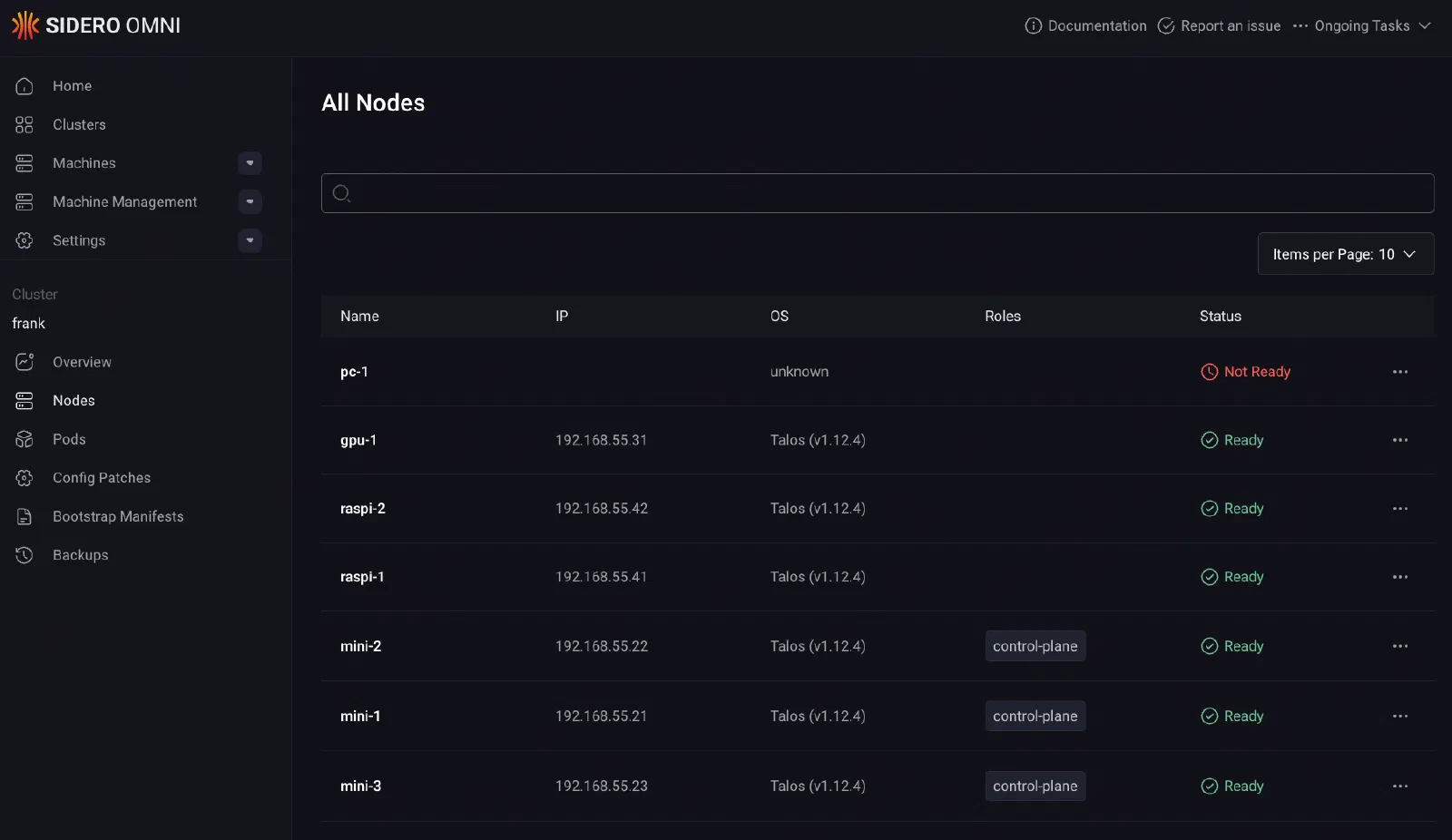
For this cluster, the bootstrap sequence was straightforward:
- Flash each machine (minis, gpu-1, pc-1, Raspberry Pis) with the Omni Talos ISO.
- Machines appear in the Omni inventory as unallocated.
- Create the
frankcluster in Omni, assignmini-1,mini-2,mini-3as control planes, the rest as workers. - Omni generates machine configs, pushes them to each node, and bootstraps etcd.
Omni lives outside this repo — it is Zone A infrastructure, managed manually on raspi-omni. Everything from Layer 1 onward is applied as config patches through omnictl, which layer on top of the base machine configs Omni generated. Each patch targets either the whole cluster or a specific machine by ID.
Verifying the Bootstrap
$ talosctl health --nodes 192.168.55.21 2>&1 | head -10
discovered nodes: ["192.168.55.31" "192.168.55.71" "192.168.55.41" "192.168.55.42" "192.168.55.21" "192.168.55.22" "192.168.55.23"]
waiting for etcd to be healthy: ...
waiting for etcd to be healthy: OK
waiting for all nodes to finish boot sequence: ...
waiting for all nodes to finish boot sequence: OK
Seven nodes, all healthy, all ready.
Layer 1: Node Configuration
With the cluster bootstrapped and all seven nodes reporting Ready, the first order of business was making the cluster usable for a homelab workload mix. That means two things: letting workloads run on the control plane nodes, and labeling every node so scheduling decisions can be targeted later.
Control Plane Scheduling
In a production environment, you keep workloads off the control plane. In a homelab with three control-plane nodes that are also the best hardware (Intel Next Unit of ComputingIntel's small-form-factor PC line. The shape of machine Frank's control-plane nodes are: desktop silicon, server duty.-class minis with 64 GB RAM each), leaving them idle is wasteful. The following Omni config patch removes the default NoSchedule taint from all control-plane nodes:
# patches/phase01-node-config/01-cluster-wide-scheduling.yaml
cluster:
    allowSchedulingOnControlPlanes: true
This is a cluster-scoped patch. Talos handles it at the config level rather than requiring kubectl taint. The result: mini-1, mini-2, and mini-3 run both control-plane components and regular workloads — essential when those three nodes are also the Longhorn storage tier.
Node Labels
Every node gets a set of labels applied through per-machine config patches. The labeling scheme encodes the zone architecture from Post 1:
# patches/phase01-node-config/03-labels-mini-1.yaml
machine:
    nodeLabels:
        zone: core
        tier: standard
        accelerator: intel-igpu
        igpu: intel-arc
# patches/phase01-node-config/03-labels-gpu-1.yaml
machine:
nodeLabels:
zone: ai-compute
tier: standard
accelerator: nvidia
model-server: "true"# patches/phase01-node-config/03-labels-raspi-1.yaml
machine:
nodeLabels:
zone: edge
tier: low-powerThe pattern across all seven nodes:
| Label | Values | Purpose |
|---|---|---|
zone | core, ai-compute, edge | Physical zone architecture |
tier | standard, low-power | Capable nodes vs Raspberry Pis |
accelerator | nvidia, intel-igpu | GPU-equipped nodes for device plugin scheduling |
igpu | intel-arc | Specific iGPU model (Intel Dynamic Resource AllocationThe Kubernetes API for requesting specialised hardware — GPUs and accelerators — with far more expressiveness than the older device-plugin counter model. driver) |
model-server | "true" | Flags gpu-1 for AI inference workloads |
These labels are applied via Talos machine config, not kubectl label. If a node reboots or is reprovisioned, the labels survive because they are part of the declarative machine state. Labels applied with kubectl are stored in the Kubernetes API and can drift if the node is recreated.
Each patch file targets a specific machine by its Omni machine ID (a Universally Unique IdentifierA 128-bit identifier chosen so collisions are not worth planning for. Note that Tekton's `$(uid)` is documented only as *random* — fine as a suffix, wrong as an identity two concurrent runs could collide on.):
metadata:
    labels:
        omni.sidero.dev/cluster: frank
        omni.sidero.dev/cluster-machine: ce4d0d52-6c10-bdc9-746c-88aedd67681b
This ID-based targeting ensures labels go to exactly the right node, every time.
Layer 2: Cilium CNI
Talos ships with Flannel as the default CNI. Flannel works for basic pod networking, but it is a minimal overlay: no network policy, no built-in observability, no LoadBalancer implementation. For a cluster that needs to expose services on the local network and wants visibility into pod-to-pod traffic, Flannel runs out of runway fast.
Three features made the switch to Cilium inevitable:
- eBPF kube-proxy replacement. Cilium handles service load balancing in eBPF at the kernel level rather than through iptables chains. Faster, and eliminates the kube-proxy DaemonSet entirely.
- L2 LoadBalancer announcements. Cilium announces LoadBalancer IPs via Address Resolution ProtocolHow a machine finds the hardware address behind an IP on the local network. Cilium's L2 announcements work by answering ARP for LoadBalancer addresses that no physical NIC owns. on the local network, giving services real IPs on the home subnet without MetalLB.
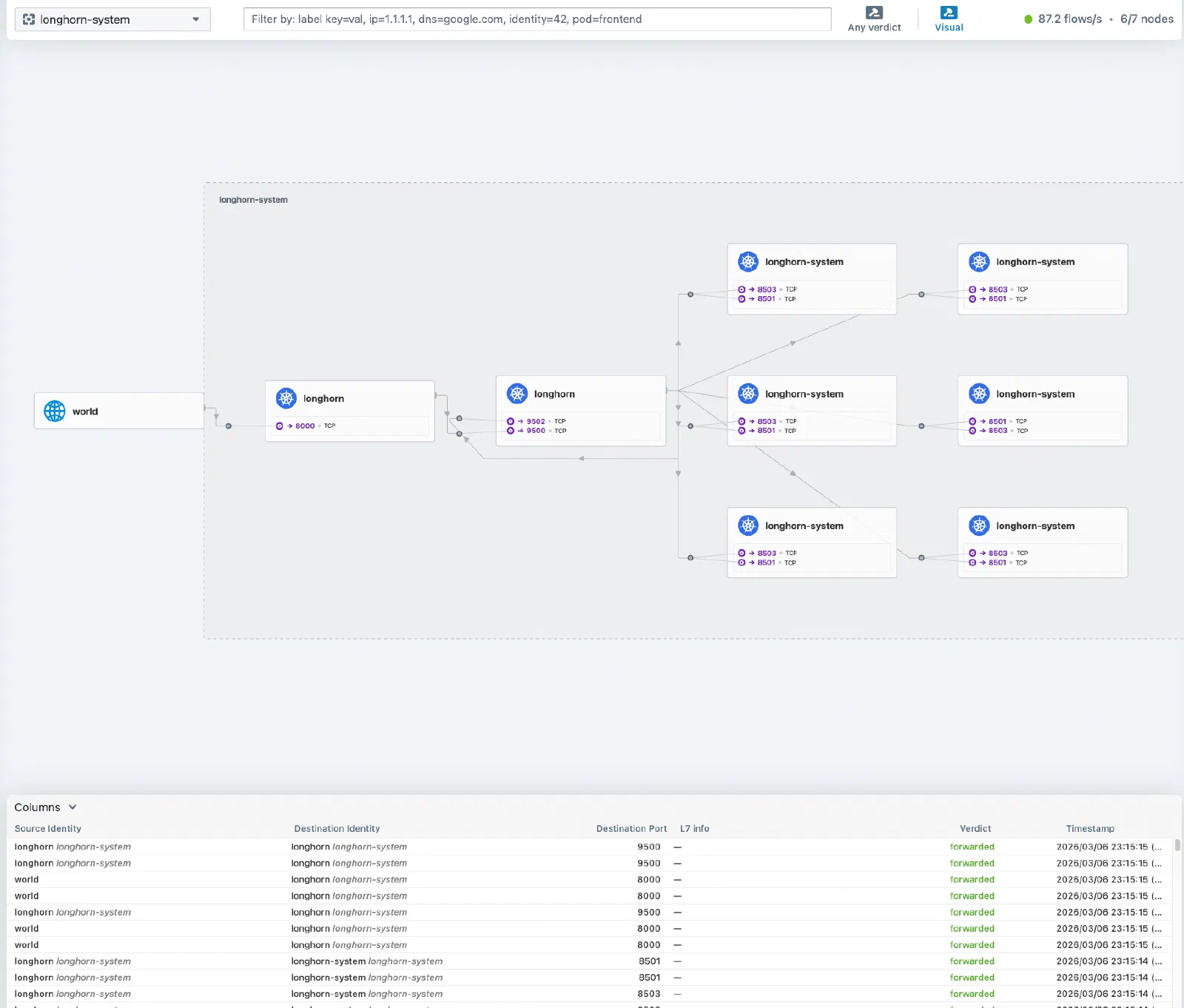
- Hubble. Built-in network observability with a UI showing every flow between pods — invaluable for debugging connectivity in a mixed-architecture cluster.
The CNI Swap
Swapping the CNI on a running cluster is tense. There is a window between disabling Flannel and Cilium becoming ready where pods cannot communicate. On a fresh cluster this is less of an issue because you can apply the patch before deploying anything. But the principle matters: understand the gap before you jump.
Step one is telling Talos to stop managing the default CNI and disable kube-proxy:
# patches/phase02-cilium/02-cluster-wide-cni-none.yaml
cluster:
    network:
        cni:
            name: none
    proxy:
        disabled: true
This patch does two things: sets cni: none so Talos does not install Flannel on new or rebooting nodes, and disables the built-in kube-proxy.
Before applying the patch, clean up the existing Flannel and kube-proxy DaemonSets:
kubectl delete ds kube-flannel -n kube-system
kubectl delete ds kube-proxy -n kube-system
The gotcha here: the kube-proxy DaemonSet does not disappear automatically after setting proxy.disabled: true. If you forget to delete it, both Cilium and kube-proxy fight over iptables rules, producing confusing connectivity issues.
Installing Cilium
Cilium is installed via its Helm chart (v1.17.0). The values require several Talos-specific settings not obvious from the standard Cilium documentation:
# apps/cilium/values.yaml (key sections)
kubeProxyReplacement: true
k8sServiceHost: 127.0.0.1
k8sServicePort: 7445

cgroup:
  autoMount:
    enabled: false
  hostRoot: /sys/fs/cgroup

hubble:
  enabled: true
  relay:
    enabled: true
  ui:
    enabled: true

operator:
  replicas: 2

l2announcements:
  enabled: true
externalIPs:
  enabled: true
The non-obvious settings are the ones most likely to cause failures:
k8sServiceHost: 127.0.0.1/k8sServicePort: 7445: Talos runs a local API server proxy on every node at127.0.0.1:7445. Since Cilium replaces kube-proxy, it needs to reach the Kubernetes API directly without relying onkubernetes.default(which kube-proxy normally handles). This localhost proxy is Talos-specific.cgroup.autoMount.enabled: false: Talos already mounts cgroups. Letting Cilium try again causes conflicts on the read-only root filesystem. Set it tofalseand pointhostRootto/sys/fs/cgroup. If you miss this, Cilium agent pods fail with mount-related errors.operator.replicas: 2: With three control-plane nodes, two operator replicas provide High AvailabilityRunning enough redundant instances that losing one does not take the service down. Frank's three control-plane nodes are its HA tier. without consuming a third node’s resources.l2announcements.enabled: true: Activates Cilium’s native L2 LoadBalancer mode, replacing MetalLB.
Beyond the Helm values, two additional manifests complete the L2 LoadBalancer setup:
# apps/cilium/manifests/lb-ippool.yaml
apiVersion: "cilium.io/v2alpha1"
kind: CiliumLoadBalancerIPPool
metadata:
  name: default-pool
spec:
  blocks:
    - start: "192.168.55.200"
      stop: "192.168.55.254"
# apps/cilium/manifests/l2-policy.yaml
apiVersion: "cilium.io/v2alpha1"
kind: CiliumL2AnnouncementPolicy
metadata:
name: default-l2-policy
spec:
interfaces:
- ^eth[0-9]+
- ^en[a-z0-9]+
externalIPs: true
loadBalancerIPs: trueThe IP pool reserves 192.168.55.200-254 on the home subnet for LoadBalancer services. The L2 announcement policy tells Cilium to respond to ARP requests on any Ethernet interface matching the regex patterns — covering both eth0 (Raspberry Pis) and enp-style names (x86 machines). Any service of type LoadBalancer automatically gets an IP from this pool and becomes reachable on the LAN.
Another gotcha that cost time: the Cilium agent requires explicit Linux capabilities to function on Talos (IPC_LOCK, SYS_RESOURCE, and others). The default Helm values do not include all of them. If Cilium pods are stuck in CrashLoopBackOff with permission errors, check the securityContext.capabilities.ciliumAgent list.
Verifying Cilium comes up healthy:
$ cilium status --wait=false 2>&1 | head -10
    /¯¯\
 /¯¯\__/¯¯\    Cilium:             OK
 \__/¯¯\__/    Operator:           OK
 /¯¯\__/¯¯\    Envoy DaemonSet:    OK
 \__/¯¯\__/    Hubble Relay:       OK
    \__/       ClusterMesh:        disabled

DaemonSet              cilium                   Desired: 7, Ready: 7/7, Available: 7/7
Deployment             cilium-operator          Desired: 2, Ready: 2/2, Available: 2/2
Deployment             hubble-relay             Desired: 1, Ready: 1/1, Available: 1/1
Deployment             hubble-ui                Desired: 1, Ready: 1/1, Available: 1/1
Exposing Hubble UI
Cilium deploys Hubble UI as a ClusterIP service by default — reachable only inside the cluster. For a homelab, you want it on the LAN. A LoadBalancer service with a fixed IP pins it to the network:
# apps/cilium/manifests/hubble-ui-service.yaml
apiVersion: v1
kind: Service
metadata:
  name: hubble-ui-lb
  namespace: kube-system
  annotations:
    io.cilium/lb-ipam-ips: "192.168.55.202"
spec:
  type: LoadBalancer
  selector:
    k8s-app: hubble-ui
  ports:
    - name: http
      port: 80
      targetPort: 8081
The io.cilium/lb-ipam-ips annotation pins this service to 192.168.55.202. Because this manifest lives in apps/cilium/manifests/, the existing cilium-config ArgoCD Application picks it up automatically. Hubble UI is then reachable at http://192.168.55.202.
What We Have Now
- 7 nodes running Talos Linux, managed by Omni
- Labeled zones (Core, AI Compute, Edge) for workload placement
- Cilium CNI with eBPF kube-proxy replacement
- L2 LoadBalancer pool (192.168.55.200-254) for service exposure
- Hubble UI for network observability at
http://192.168.55.202
The cluster has a networking substrate that will serve every layer above it — storage, GPU compute, ingress, and beyond.
Missteps
| What Happened | Why It Was Wrong | How We Fixed It | Commit |
|---|---|---|---|
| MetalLB was installed first — Cilium’s native L2 LoadBalancer was discovered months later during a routine docs read | Running MetalLB alongside Cilium added an unnecessary dependency and a separate configuration surface | Switched to Cilium L2 with CiliumLoadBalancerIPPool and CiliumL2AnnouncementPolicy, removed MetalLB | e97b7d25 |
Hubble and Longhorn UI had no LoadBalancer exposure — only reachable via kubectl port-forward for months | Debugging required manual port-forwarding every session, adding friction to daily operations | Added hubble-ui-service.yaml and longhorn-ui-lb.yaml with io.cilium/lb-ipam-ips for fixed LAN IPs | ac4255b1 |
Cilium canary plugin broke Argo Rollouts — the trafficRouterPlugin config used Cilium HTTP route CustomResourceDefinitionThe object that teaches the Kubernetes API a new resource type. Install a CRD and the API server starts serving a kind it has never heard of, with validation and RBAC like any built-in. that were not installed | The plugin required CRDs the cluster did not have; pods got stuck in degraded state during canary deployments | Reverted to replica-count weighting for canary analysis, dropped the CRD-based router | 65dcabdb, b3f86231 |
| High-cardinality node-meta labels flooded VictoriaMetrics — default pod metadata created billions of unique series, causing Out Of MemoryWhat the kernel does when memory runs out — it kills a process by score, not by fault. A container hitting its cgroup limit is killed the same way, which is why the victim is often not the culprit. | node-meta labels included pod IPs and container IDs — highly variable values that explode cardinality | Dropped high-cardinality labels via Cilium Helm value overrides | 193c3890 |
References
- Talos Linux — Immutable, secure, minimal Kubernetes OS
- Talos Machine Configuration Reference — Declarative machine config documentation
- Sidero Omni — Kubernetes cluster management for Talos
- Deploying Cilium CNI on Talos — Official Cilium + Talos guide
- Cilium — Kubernetes Without kube-proxy — eBPF kube-proxy replacement
- Cilium L2 Announcements — L2 LoadBalancer docs
- Hubble — Network Observability — Cilium’s observability platform