

Operating on Cluster & Nodes
Last updated 2026-07-15 ·a8bed9a
This is the operational companion to Building the Foundation. That post covers why we chose Talos and Cilium and how they were deployed. This one covers what you type when something looks off — node health, networking diagnostics, config patches, and the failure patterns that have bitten us more than once.
Before any of the commands below, source the environment:
source .env          # sets KUBECONFIG, TALOSCONFIG
source .env_devops   # sets OMNICONFIG + service account for omnictl
What Healthy Looks Like
A healthy Frank means all seven nodes are Ready, every Cilium agent pod is running, and Hubble is collecting flows. That is the baseline you check against.
$ kubectl get nodes -o wide
NAME      STATUS   ROLES           AGE   VERSION   INTERNAL-IP     EXTERNAL-IP   OS-IMAGE          KERNEL-VERSION   CONTAINER-RUNTIME
gpu-1     Ready    <none>          49d   v1.35.3   192.168.55.31   <none>        Talos (v1.12.6)   6.18.18-talos    containerd://2.1.6
mini-1    Ready    control-plane   49d   v1.35.3   192.168.55.21   <none>        Talos (v1.12.6)   6.18.18-talos    containerd://2.1.6
mini-2    Ready    control-plane   49d   v1.35.3   192.168.55.22   <none>        Talos (v1.12.6)   6.18.18-talos    containerd://2.1.6
mini-3    Ready    control-plane   49d   v1.35.3   192.168.55.23   <none>        Talos (v1.12.6)   6.18.18-talos    containerd://2.1.6
pc-1      Ready    <none>          49d   v1.35.3   192.168.55.71   <none>        Talos (v1.12.6)   6.18.18-talos    containerd://2.1.6
raspi-1   Ready    <none>          49d   v1.35.3   192.168.55.41   <none>        Talos (v1.12.6)   6.18.18-talos    containerd://2.1.6
raspi-2   Ready    <none>          49d   v1.35.3   192.168.55.42   <none>        Talos (v1.12.6)   6.18.18-talos    containerd://2.1.6

$ cilium status --wait=false | head -25
    /¯¯\
 /¯¯\__/¯¯\    Cilium:             OK
 \__/¯¯\__/    Operator:           OK
 /¯¯\__/¯¯\    Envoy DaemonSet:    OK
 \__/¯¯\__/    Hubble Relay:       OK
    \__/       ClusterMesh:        disabled

DaemonSet              cilium                   Desired: 7, Ready: 7/7, Available: 7/7
DaemonSet              cilium-envoy             Desired: 7, Ready: 7/7, Available: 7/7
Deployment             cilium-operator          Desired: 2, Ready: 2/2, Available: 2/2
Deployment             hubble-relay             Desired: 1, Ready: 1/1, Available: 1/1
Deployment             hubble-ui                Desired: 1, Ready: 1/1, Available: 1/1
Containers:            cilium                   Running: 7
                       cilium-envoy             Running: 7
                       cilium-operator          Running: 2
                       hubble-relay             Running: 1
                       hubble-ui                Running: 1
Cluster Pods:          135/135 managed by Cilium
    graph LR
  subgraph CP["Control Plane (mini-1/2/3)"]
    M1["mini-1<br/>192.168.55.21"]
    M2["mini-2<br/>192.168.55.22"]
    M3["mini-3<br/>192.168.55.23"]
  end
  subgraph WORK["Worker Nodes"]
    G1["gpu-1<br/>192.168.55.31"]
    PC["pc-1<br/>192.168.55.71"]
    R1["raspi-1<br/>192.168.55.41"]
    R2["raspi-2<br/>192.168.55.42"]
  end
  CIL["Cilium CNI"] --> M1
  CIL --> M2
  CIL --> M3
  CIL --> G1
  CIL --> PC
  CIL --> R1
  CIL --> R2
Verify
All nodes Ready, all Cilium components OK, all daemonsets at Ready: 7/7. Run the two commands above (kubectl get nodes -o wide and cilium status --wait=false) — if any node is NotReady or any Cilium component is not OK, proceed to the Runbook section below.
Observing State
Cluster and Node Health
Start with the big picture. Talos has a built-in health check that validates etcd, the API server, kubelet, and node readiness in one shot against any control-plane node:
talosctl health --nodes 192.168.55.21For a quick view of all nodes and their status, IPs, and kernel versions:
kubectl get nodes -o wideTo check which Talos version each node is running (useful before and after upgrades):
talosctl version --nodes 192.168.55.21,192.168.55.22,192.168.55.23If a Raspberry Pi drops to NotReady, they occasionally take longer to rejoin after a network blip — give it a minute before digging deeper.
Cilium and Networking
cilium statusLook for OK next to each component. The KubeProxyReplacement line should show True — Frank runs Cilium as a full kube-proxy replacement (apps/cilium/values.yaml:4, kubeProxyReplacement: true).
To watch live network flows between pods:
hubble observeFilter by namespace, pod, or verdict:
hubble observe --namespace longhorn-system
hubble observe --verdict DROPPED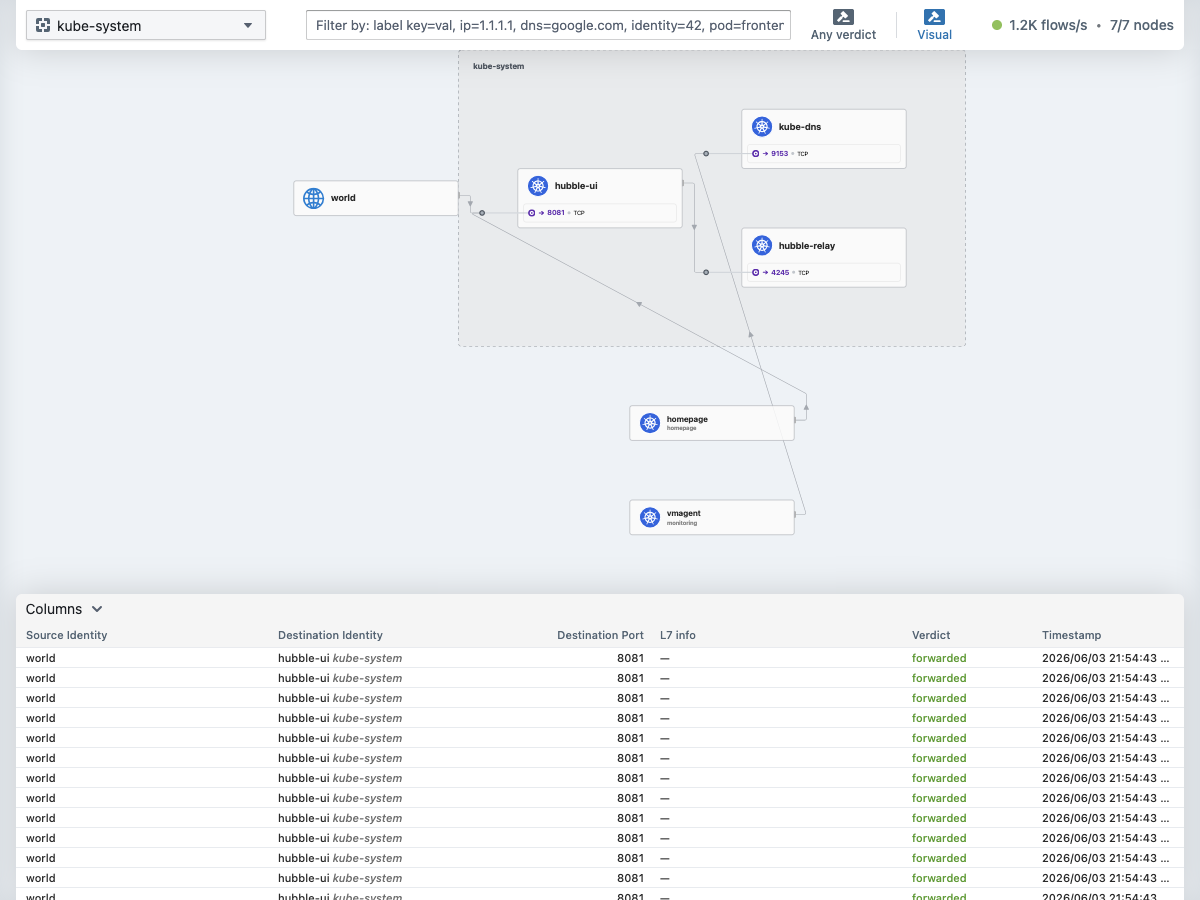
Node-Level Diagnostics
Talos has no SSH. These are your only window into what the OS is doing:
# Kernel messages (equivalent to dmesg)
talosctl dmesg --nodes 192.168.55.31

# Service logs (kubelet, containerd, etcd, etc.)
talosctl logs kubelet --nodes 192.168.55.21
talosctl logs containerd --nodes 192.168.55.31

# Check which Talos extensions are loaded
talosctl -n 192.168.55.31 get extensions
Routine Operations
Upgrading Talos
Talos upgrades are applied node by node. The node reboots into the new version, and workloads are drained and rescheduled automatically:
talosctl upgrade --nodes 192.168.55.21 \
  --image ghcr.io/siderolabs/installer:v1.9.5
Control-plane nodes one at a time — wait for each to rejoin before proceeding. Upgrading all three simultaneously will take down etcd quorum.
When managing through Omni, upgrades can also be triggered from the dashboard or via omnictl:
omnictl get machinesThis shows each machine’s current OS version, connected status, and cluster membership.
Applying Config Patches
All node customization on Frank flows through Omni config patches (patches/phase01-node-config/README.md:27). To apply a new or updated patch:
omnictl apply -f patches/phase01-node-config/03-labels-mini-1.yamlOmni merges the patch into the node’s machine config. Depending on the change, the node may reboot automatically:
talosctl reboot --nodes 192.168.55.21To roll back a patch:
omnictl delete configpatch <patch-id>Gotcha: On Unified Kernel ImageKernel, initrd and command line in one signed binary. What lets Secure Boot verify the whole boot path instead of just the loader.-booted machines (gpu-1 with SecureBoot), ConfigPatches with machine.install.extraKernelArgs is inert — the UKI cmdline is baked into the signed image and extraKernelArgs doesn’t change the schematic ID, so Omni never reinstalls. Use KernelArgs.omni.sidero.dev instead (patches/phase04-gpu/403-gpu1-pcie-aspm.yaml:38):
omnictl get kernelargsstatus <machine-id>Cleaning Up Stale Pods
Completed and Failed pods accumulate because Helm chart Jobs rarely set ttlSecondsAfterFinished. They consume no CPU or memory, but they clutter kubectl get pods and burn etcd space (~2–4 KB per pod object).
To clean them up:
# Delete all Succeeded pods cluster-wide
kubectl get pods -A --field-selector=status.phase==Succeeded \
  -o json | kubectl delete -f -

# Delete all Failed pods cluster-wide
kubectl get pods -A --field-selector=status.phase==Failed \
  -o json | kubectl delete -f -
The cluster-wide terminated-pod garbage collector threshold is 12,500 pods, so on a homelab they accumulate indefinitely without periodic cleanup.
Rebooting Nodes
talosctl reboot --nodes 192.168.55.31The node drains itself before rebooting. For control-plane nodes, make sure etcd quorum will survive (at least two of three must remain up).
Runbook
Node NotReady
If kubectl get nodes shows a node as NotReady:
Check Talos health from a working control-plane node:
talosctl health --nodes 192.168.55.21Check kernel messages for hardware or driver errors:
talosctl dmesg --nodes <problem-node-IP>Check etcd if it is a control-plane node:
talosctl etcd status --nodes 192.168.55.21
talosctl etcd members --nodes 192.168.55.21
Check kubelet logs for registration or certificate issues:
talosctl logs kubelet --nodes <problem-node-IP>
Recovery: DNS boot hang
A node that pings but never reaches Ready (Internet Control Message ProtocolThe protocol behind `ping` and path-MTU discovery. Blocking it wholesale breaks more than it protects. replies, apid:50000 refuses, Omni shows CONNECTED: false) is likely stuck on the time-sync gate. The root cause: a static interface with no nameservers falls back to public DNS (1.1.1.1, 8.8.8.8), which the homelab Access Control ListAn ordered list of allow/deny rules attached to a resource. In Headscale it decides which mesh node may reach which service, independent of network routing. blocks → Network Time ProtocolHow machines keep their clocks synchronised. Not optional on Talos: it gates the kubelet on time sync, so a node that cannot reach a time server never finishes booting. never syncs → apid/kubelet hang.
Fix: Apply the cluster-wide nameservers patch:
omnictl apply -f patches/phase01-node-config/02-cluster-wide-nameservers.yamlThis sets machine.network.nameservers: [192.168.10.11, 192.168.10.12] (see patches/phase01-node-config/02-cluster-wide-nameservers.yaml:28-30). Temporarily, ACL-allow 1.1.1.1:53 for the affected host to unstick it.
Verify: talosctl dmesg --nodes <IP> | grep -i ntp should show sync success; kubectl get nodes <IP> eventually returns Ready.
Pod Networking Issues
When pods cannot reach each other or external services:
Run the Cilium connectivity test:
cilium connectivity testThis deploys test pods and checks DNS, pod-to-pod, pod-to-service, and egress flows.
Observe flows for a specific pod:
hubble observe --pod <namespace>/<pod-name>
hubble observe --pod default/my-app --verdict DROPPED
Check Cilium endpoint status:
cilium endpoint listEndpoints in a state other than
readyindicate the agent has not finished programming Berkeley Packet FilterA tiny in-kernel virtual machine. Its extended form (eBPF) is how Cilium implements networking, policy and load balancing without iptables. for that pod.
Recovery: restart the Cilium agent
If cilium status --brief shows degradation but the pod is Running:
kubectl logs -n kube-system ds/cilium -c cilium-agent --tail=100 | grep -Ei 'direct routing|datapath|node config'Then restart the agent:
kubectl rollout restart -n kube-system ds/ciliumCommon causes on Talos: missing security capabilities (IPC_LOCK, SYS_RESOURCE) or cgroup mount conflicts — our cilium-values.yaml sets cgroup.autoMount.enabled: false and cgroup.hostRoot: /sys/fs/cgroup (apps/cilium/values.yaml:28-31) to match Talos’s layout.
Cilium Agent Crashing
kubectl logs -n kube-system ds/cilium -c cilium-agent --tail=100
kubectl get pods -n kube-system -l k8s-app=cilium
Recovery: NIC link-flap
If all pod traffic on one node drops (SSH-via-Load BalancerWhatever spreads traffic across backends and gives them one address. On Frank that is Cilium answering for an address on the LAN, not a cloud appliance. dies, kubectl exec still works) and the Cilium agent logs contain "IPv4 direct routing device IP not found" or "Failed to initialize datapath, retrying later", a physical Network Interface CardThe network adapter itself. Worth naming precisely on Frank, where one flapping onboard NIC took down every pod on a node at once. link-flap has stripped the node IP off Cilium’s direct-routing device (docs/runbooks/frank-gotchas/networking.md:62-143).
# Check for link flaps
talosctl -n <IP> dmesg | grep 'Link is'
Recovery is physical — reseat the cable or replace the NIC. Do not drain the node if it carries hard-pinned GPU workloads; restarting the Cilium agent pod on that node may restore datapath without a full node drain.
Omni Unreachable
If omnictl commands return gRPC 500s or the browser shows a Transport Layer SecurityThe encryption under HTTPS and most other secure protocols. What a certificate is for, and what fails visibly when the certificate does not match the hostname. error:
Recovery: cert expiry
Omni’s TLS leaf cert has expired. The snap-installed certbot timer scans /etc/letsencrypt/ but Omni uses a custom --config-dir, so automatic renewal does not fire (docs/investigations/2026-05-11--omni--cert-expiry-incident.md).
ssh frank-omni
certbot renew --config-dir /opt/manual_install/certbot/config \
  --deploy-hook 'docker restart omni'
Recovery: wedged reconcile runtime
After a cold-boot clock-jump, Omni’s reconcile loop can freeze — it serves cached reads but applies nothing. No config patches take effect even though configuptodate: true. Fix (docs/runbooks/frank-gotchas/omni.md:45-106):
ssh frank-omni
docker restart omni
Then refresh your Talos config:
omnictl talosconfig .talos/Frank_Talos_Config.yaml -c frank -f --merge=falseMissteps
| What we assumed | Why it was wrong | What it cost |
|---|---|---|
ConfigPatches machine.install.extraKernelArgs works on UKI machines | The UKI cmdline is baked into the signed image; extraKernelArgs doesn’t change the schematic ID, so Omni never reinstalls | Hours debugging why PCIe ASPM args wouldn’t stick on gpu-1. Fixed via KernelArgs.omni.sidero.dev resource (patches/phase04-gpu/403-gpu1-pcie-aspm.yaml). |
| Omni cert auto-renews via snap’s certbot timer | The snap certbot scans /etc/letsencrypt/; Omni’s install uses a custom --config-dir | Cert expired silently for 30+ days, taking down the management plane. Fixed via dedicated systemd unit (omni/certbot/certbot.md). |
| Omni reconcile is resilient to clock jumps | A cold-boot clock skew freezes the reconcile runtime — Omni serves cached reads but applies nothing | Config patches silently unapplied; reboot of affected nodes did nothing. Fixed by docker restart omni. |
| Static-IP nodes get DNS from Dynamic Host Configuration ProtocolHow a machine is handed an address and DNS servers on boot. Frank's nodes deliberately do not use it — static addressing is why a missing nameserver entry can strand a node entirely. | Static dhcp: false → Talos falls back to public resolvers blocked by homelab ACL | Nodes ping but never reach Ready (time-sync gate). Fixed fleet-wide by cluster-wide nameservers patch (patches/phase01-node-config/02-cluster-wide-nameservers.yaml). |
Quick Reference
| Command | What It Does |
|---|---|
source .env && source .env_devops | Set up kubectl, talosctl, and omnictl contexts |
talosctl health --nodes <IP> | Full cluster health check via a single node |
kubectl get nodes -o wide | List all nodes with status, IPs, versions |
talosctl version --nodes <IP> | Show Talos OS version on a node |
talosctl dmesg --nodes <IP> | Kernel messages (like dmesg over SSH) |
talosctl logs <svc> --nodes <IP> | Service logs (kubelet, containerd, etcd) |
talosctl -n <IP> get extensions | List loaded Talos extensions |
talosctl upgrade --nodes <IP> --image <img> | Upgrade Talos on a node |
talosctl reboot --nodes <IP> | Graceful node reboot with drain |
talosctl etcd status --nodes <IP> | etcd cluster health |
talosctl etcd members --nodes <IP> | List etcd members |
omnictl get machines | Show all machines managed by Omni |
omnictl get clustermachinestatus | Machine READY/reconciling status |
omnictl apply -f <patch> | Apply a Talos config patch through Omni |
omnictl delete configpatch <id> | Roll back a config patch |
omnictl get kernelargsstatus <machine-id> | Verify kernel args applied (UKI machines) |
cilium status | Cilium agent and operator health |
cilium connectivity test | End-to-end networking validation |
cilium endpoint list | List all Cilium-managed pod endpoints |
hubble observe | Stream live network flows |
hubble observe --verdict DROPPED | Show only dropped flows |
kubectl rollout restart -n kube-system ds/cilium | Restart Cilium agent across all nodes |
kubectl logs -n kube-system ds/cilium -c cilium-agent --tail=100 | Cilium agent logs |
kubectl get pods -A --field-selector=status.phase==Succeeded -o json | kubectl delete -f - | Delete all Completed pods |
kubectl get pods -A --field-selector=status.phase==Failed -o json | kubectl delete -f - | Delete all Failed pods |
docker restart omni | Revive wedged Omni reconcile runtime |
certbot renew --config-dir /opt/manual_install/certbot/config --deploy-hook 'docker restart omni' | Renew Omni TLS cert |
Explanation
This post covers the subset of cluster operations that happen outside ArgoCD — things you reach for when a node won’t come back, Cilium drops traffic, or Omni stops applying patches. The building companion post covers why we chose these components; this one covers what to do when they misbehave.
The failure patterns in the Runbook section are not hypothetical. Each one bit us in production — the DNS boot hang took down gpu-1 for hours during a cold boot, the Omni cert expiry silently locked us out of the management plane for a month, and the inert extraKernelArgs on UKI cost days of debugging. We have documented each in the gotcha runbooks (docs/runbooks/frank-gotchas/); this section is the quick-access version.
References
- Talos CLI Reference — Full
talosctlcommand documentation - Cilium Operations Guide — Day-2 operations for Cilium
- Hubble Documentation — Network observability CLI and UI
- Omni Documentation — Sidero Omni machine management
- Frank Gotchas — Networking — Frank-specific networking failure playbooks
- Frank Gotchas — Omni — Frank-specific Omni failure playbooks
- Patches README — Machine ID to hostname to IP mapping
- Frank Infrastructure — Node IP/hardware inventory and service LB IPs