

Operating on Storage & Backups
Last updated 2026-08-01 ·104c5bb
This is the operational runbook for Longhorn storage and Cloudflare R2 backups on Frank. For the full story on how storage was set up, see Persistent Storage with Longhorn. For the backup architecture and the Longhorn 1.11 gotchas that shaped the current design, see Backup — Longhorn to Cloudflare R2.
Source your environment before running any commands:
source .env # sets KUBECONFIGOverview
Frank runs Longhorn for distributed block storage. The default StorageClass replicates every volume three times across the control-plane nodes (apps/longhorn/values.yaml:3, defaultReplicaCount: 3). Two additional StorageClasses exist:
longhorn-gpu-local— single-replica, strict-local (dataLocality: strict-local), pinned to gpu-1’s dedicated SSDs viadiskSelector: gpu-local(apps/longhorn/manifests/gpu-local-sc.yaml)longhorn-cicd— single-replica, best-effort, for CI/CD workloads on pc-1 (apps/longhorn/manifests/storageclass-longhorn-cicd.yaml)
Raspberry Pi nodes have scheduling disabled — Longhorn does not place replicas on them.
All volumes in the default group are backed up to a Cloudflare R2 bucket on two schedules:
- Daily at 02:00 UTC — 7 recovery points retained (
apps/longhorn/manifests/recurring-job-daily.yaml) - Weekly on Sunday at 03:00 UTC — 4 recovery points retained (
apps/longhorn/manifests/recurring-job-weekly.yaml)
Both RecurringJobs target the R2 BackupTarget (apps/longhorn/manifests/backup-target-default.yaml, URL s3://frank-longhorn-backups@auto/). Network File SystemThe long-standing protocol for mounting a remote directory as if it were local. Simple and universal; its locking semantics are the usual source of surprises. backup target is disabled pending a Longhorn bug fix in v1.13 (apps/longhorn/manifests/backup-target-nas.yaml, entirely commented out).
    graph LR
  subgraph CP["Control-Plane (replica=3)"]
    M1["mini-1"]
    M2["mini-2"]
    M3["mini-3"]
  end
  subgraph GPU["GPU Node"]
    G1["gpu-1<br/>local SSD"]
  end
  subgraph PC["PC Node"]
    P1["pc-1<br/>longhorn-cicd"]
  end
  M1 --> LH["Longhorn<br/>replica=3"]
  M2 --> LH
  M3 --> LH
  G1 --> LG["longhorn-gpu-local<br/>single-replica"]
  P1 --> LC["longhorn-cicd<br/>single-replica"]
  LH --> R2["Cloudflare R2<br/>s3://frank-longhorn-backups"]
  LG --> R2
  LC --> R2
Verify
# All volumes healthy, no degraded/faulted entries
kubectl get volumes.longhorn.io -n longhorn-system

# Backup target reachable
kubectl get backuptargets.longhorn.io -n longhorn-system -o wide
Healthy output for volumes shows all ROBUSTNESS: healthy. For backup targets, AVAILABLE must be true.
Observing State
Volume Health
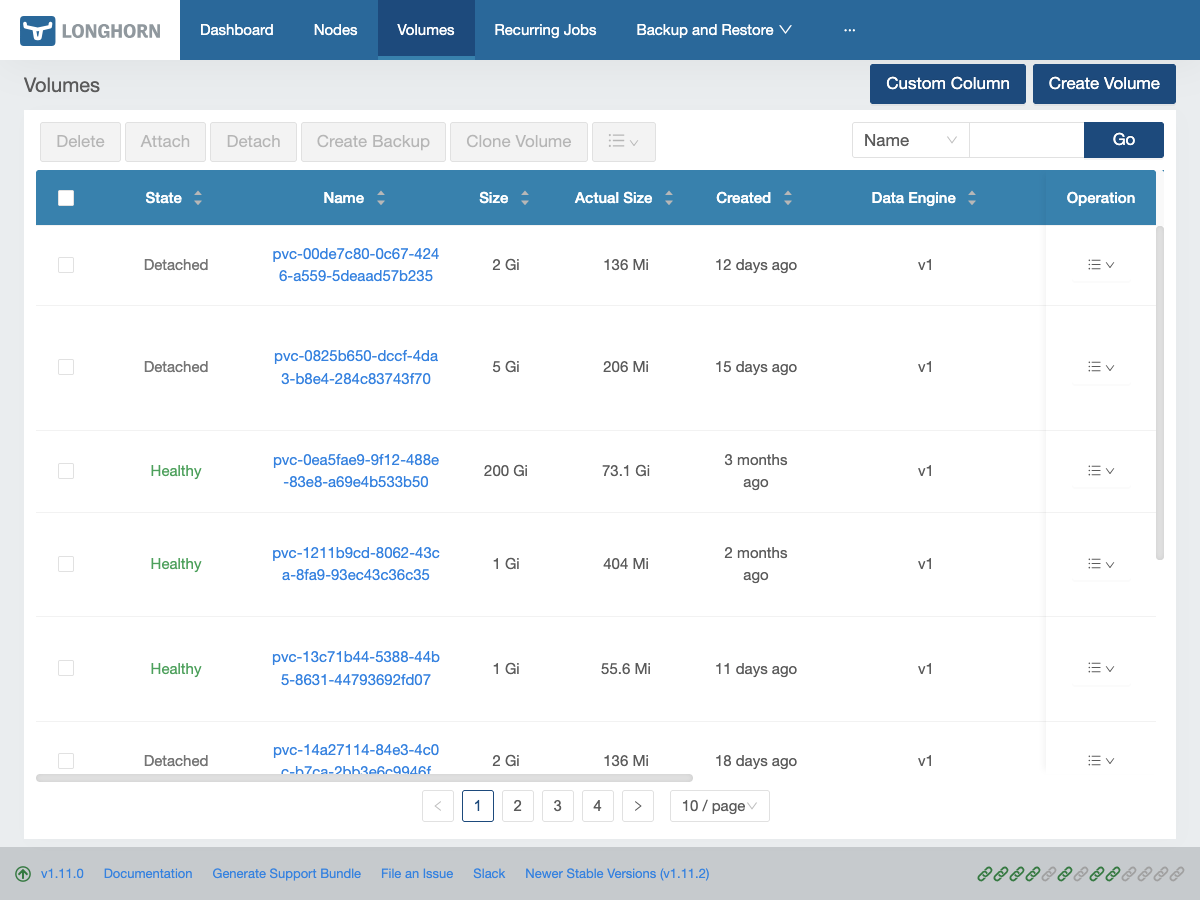
kubectl get volumes.longhorn.io -n longhorn-systemA healthy volume shows State: attached (if in use) or detached (if idle), with Robustness: healthy. Anything showing degraded or faulted needs attention.
$ kubectl get volumes.longhorn.io -n longhorn-system
NAME                                       DATA ENGINE   STATE      ROBUSTNESS   SCHEDULED   SIZE           NODE      AGE
pvc-0ea5fae9-9f12-488e-83e8-a69e4b533b50   v1            attached   healthy                  32212254720    gpu-1     42d
pvc-1211b9cd-8062-43ca-8fa9-93ec43c36c35   v1            attached   healthy                  1073741824     mini-2    8d
# ... (truncated — 20 volumes, all healthy)
For more detail on a specific volume:
kubectl get volume.longhorn.io <volume-name> -n longhorn-system -o yaml
# or
kubectl describe volume.longhorn.io <volume-name> -n longhorn-system
Longhorn UI
The dashboard at http://192.168.55.201 gives a visual overview of volume health, replica distribution, node capacity, and backup status.
Backup Jobs
Check the RecurringJob schedule and retention:
kubectl get recurringjobs.longhorn.io -n longhorn-systemCheck the backup target status:
kubectl get backuptargets.longhorn.io -n longhorn-systemExpected output:
NAME      URL                              CREDENTIAL        AVAILABLE   LASTSYNCEDAT
default   s3://frank-longhorn-backups@auto/   longhorn-r2-secret   true        2026-07-15T02:00:00Z
List recent backups for a specific volume. The label on a Backup is backup-volume, and <volume-name> is the PV name (pvc-<uuid>), not the PVC name:
kubectl get backups.longhorn.io -n longhorn-system \
  -l backup-volume=<volume-name> \
  --sort-by=.metadata.creationTimestamp
Do not reach for longhornvolume here out of habit. It is a real Longhorn label on replicas.longhorn.io, engines.longhorn.io and snapshots.longhorn.io — all three verified live — and it is absent on Backup alone. So the habit is learned correctly on three kinds and is silently wrong on the fourth, where the bad selector returns No resources found: the same output you would get if every backup were genuinely missing. The label set is per-kind, so confirm it against the kind you are querying rather than assuming it carries over:
kubectl get backups.longhorn.io -n longhorn-system -o json \
  | jq '.items[0].metadata.labels'
Node and Disk Status
kubectl get nodes.longhorn.io -n longhorn-system -o wideThis shows per-node scheduling state and disk capacity. Both Raspberry Pi nodes should show ALLOWSCHEDULING: false.
Routine Operations
Expand a Volume
Longhorn supports online volume expansion. Edit the PersistentVolumeClaimA Kubernetes request for durable storage. The pod names a claim and the storage layer — Longhorn on Frank — binds real disk behind it, so the data outlives the pod.:
kubectl patch pvc <pvc-name> -n <namespace> \
  -p '{"spec":{"resources":{"requests":{"storage":"20Gi"}}}}'
The underlying Longhorn volume and filesystem expand automatically. No pod restart needed for ext4. For X File SystemA journalling filesystem that handles large files and parallel I/O well. One of the options underneath a Longhorn volume., run inside the pod:
xfs_growfs /“Automatically” assumes Longhorn accepts the request — and it may not. Longhorn’s provisioning ceiling counts each replica’s declared size, not bytes written, so a node can be half-empty and still refuse to grow a volume:
size + StorageScheduled <= (StorageMax - StorageReserved) * overProvisioningPercentage%When that clause fails, the API server still accepts the patch and ArgoCD still reports Synced — status.capacity.storage simply never changes. Measured 2026-07-27 while growing a 20Gi volume: two of its three replicas sat on nodes with 5Gi and −4Gi of headroom, while those disks were roughly 55% physically written.
So check headroom on the nodes hosting the replicas before expanding:
kubectl -n longhorn-system get nodes.longhorn.io -o json | jq -r '
  .items[] | .metadata.name as $n |
  (.status.diskStatus | to_entries[] |
    "\($n) scheduled=\((.value.storageScheduled/1073741824)|floor)Gi " +
    "max=\((.value.storageMaximum/1073741824)|floor)Gi")'
and verify afterwards against the artifact rather than the sync status:
kubectl -n <namespace> get pvc <pvc-name> -o jsonpath='{.status.capacity.storage}{"\n"}'
kubectl -n <namespace> exec deploy/<app> -- df -h <mountpath>
Frank’s ceiling was raised from the chart default of 100% to 150% (apps/longhorn/values.yaml); the physical guard, storageMinimalAvailablePercentage: 15, is untouched and remains what actually prevents filling a disk. Full treatment of this failure mode in Operating on Green.
Trigger a Manual Backup
Before maintenance, take an immediate backup outside the scheduled window:
kubectl create -f - <<EOF
apiVersion: longhorn.io/v1beta2
kind: Backup
metadata:
  generateName: manual-backup-
  namespace: longhorn-system
  labels:
    backup-volume: <volume-name>
spec:
  snapshotName: ""
EOF
Leaving snapshotName empty tells Longhorn to take a fresh snapshot and back it up. Track progress in the Longhorn UI under Backup.
Restore a Volume from Backup
Via the Longhorn UI:
- Open
http://192.168.55.201→ Backup - Find the volume, select a recovery point (daily or weekly)
- Click Restore — choose replica count and target StorageClass
- Longhorn creates a new volume
Via CLI, create a new volume referencing the backup URL:
kubectl create -f - <<EOF
apiVersion: longhorn.io/v1beta2
kind: Volume
metadata:
  name: restored-<volume-name>
  namespace: longhorn-system
spec:
  fromBackup: "s3://frank-longhorn-backups@auto/?backup=<backup-name>&volume=<volume-name>"
  numberOfReplicas: 3
  dataLocality: best-effort
EOF
Then create a PersistentVolumeThe actual piece of storage a PVC binds to. The claim is the request; the PV is what satisfies it. and PVC pointing to the restored volume, or use the Longhorn UI to create the PVC automatically.
Manage Snapshots
# List snapshots for a volume
kubectl get snapshots.longhorn.io -n longhorn-system \
  -l longhornvolume=<volume-name>

# Delete old snapshots (Longhorn retains per RecurringJob retain count)
kubectl delete snapshot.longhorn.io <snapshot-name> -n longhorn-system
Verify R2 Backup Credentials
If backups start failing:
kubectl get secret longhorn-r2-secret -n longhorn-system
kubectl get backuptargets.longhorn.io -n longhorn-system
If AVAILABLE is false, the R2 credentials may be missing or invalid. Re-apply from the encrypted source:
sops --decrypt secrets/longhorn/r2-secret.yaml | kubectl apply -f -Runbook
Volume Degraded
A degraded volume has fewer healthy replicas than requested.
# Check which replicas are unhealthy
kubectl get replicas.longhorn.io -n longhorn-system \
  -l longhornvolume=<volume-name>

# Check node status — is a node offline?
kubectl get nodes
kubectl get nodes.longhorn.io -n longhorn-system
If a node is temporarily down (reboot, maintenance), Longhorn rebuilds the replica when the node returns. If a node is permanently gone, nodeDownPodDeletionPolicy: delete-both-statefulset-and-deployment-pod triggers auto-rebuild.
Force-rebuild a replica on a different node by deleting the failed replica:
kubectl delete replica.longhorn.io <replica-name> -n longhorn-systemLonghorn schedules a new replica on a healthy node automatically.
Recovery: IM memory wedge
If a node goes NotReady with memory pressure (Layer 1 alert layer-1-node-memory-headroom below 1 GiB), the Longhorn instance manager may have leaked memory. Known in v1.11.0 (~0.9 GiB/day) — fixed in v1.11.1+. The recovery is a power-cycle (docs/investigations/2026-06-04--stor--raspi-1-memory-wedge-incident.md).
# Confirm no volumes are degraded first
kubectl get volumes.longhorn.io -n longhorn-system | grep -v healthy

# If all healthy, reboot the affected node
talosctl reboot --nodes <node-ip>
Do not force-delete VolumeAttachments — scale the workload to 0 and let natural detach happen. A force-delete mid-write can blow up ext4 journals.
Backup Failed
Check the backup target availability first:
kubectl get backuptargets.longhorn.io -n longhorn-system -o yamlLook at status.conditions — common failures:
- Credential error: R2 secret missing or wrong. Verify with
kubectl get secret longhorn-r2-secret -n longhorn-system -o yamland check thatAWS_ACCESS_KEY_ID,AWS_SECRET_ACCESS_KEY, andAWS_ENDPOINTSare present. - Network error: Check DNS resolution and outbound HTTPS connectivity from a Longhorn pod.
- Bucket not found: Verify the bucket name matches
backupTargetURL.
Check the Longhorn manager logs:
kubectl logs -n longhorn-system -l app=longhorn-manager --tail=50 | grep -i backupRecovery: stale backups (Grafana alert)
The Layer 9 alert layer-9-backup-stale fires when daily-nas goes >48h or weekly-r2 >10d without success. To diagnose:
kubectl -n longhorn-system get jobs --sort-by=.status.startTime | tail -5If the CronJob is healthy but individual backups fail, the BackupTarget may have drifted — check ArgoCD sync status on the longhorn-extras Application.
Volume Stuck Attaching
A volume stuck in attaching state usually means iSCSI issues:
# Check the volume attachment status
kubectl describe volume.longhorn.io <volume-name> -n longhorn-system

# Check the engine status
kubectl get engines.longhorn.io -n longhorn-system \
  -l longhornvolume=<volume-name> -o yaml

# Verify iSCSI is running on the target node
talosctl -n <node-ip> services | grep iscsid

# If iscsid is missing, check extensions
talosctl -n <node-ip> get extensions
If iSCSI is not running, the iscsi-tools Talos extension may have been lost during an upgrade.
Recovery: force-detach
As a last resort:
kubectl patch volume.longhorn.io <volume-name> -n longhorn-system \
  --type merge -p '{"spec":{"nodeID":""}}'
This clears the node assignment and lets Longhorn re-attach the volume when the consuming pod is rescheduled. Do not force-delete the VolumeAttachment object — scale the workload to 0 and let the natural detach complete.
Missteps
| What we assumed | Why it was wrong | What it cost |
|---|---|---|
| Both daily and weekly backups can use separate targets (NFS + R2) | Longhorn v1beta2 RecurringJob CustomResourceDefinitionThe object that teaches the Kubernetes API a new resource type. Install a CRD and the API server starts serving a kind it has never heard of, with validation and RBAC like any built-in. has no backupTargetName field — only concurrency, cron, groups, labels, name, parameters, retain, task (#11392 closed without fix) | Both jobs route to single R2 target. NFS BackupTarget exists in the repo but is commented out (apps/longhorn/manifests/backup-target-nas.yaml). |
| NFS backup target works | Longhorn 1.11 generates host/path instead of host:/path for NFS (bug #11412) | NFS target disabled until v1.13 fix. |
| ArgoCD can manage the R2 backup secret through Server-Side ApplyKubernetes applying changes field by field, with each manager owning the fields it sets. Frank uses it everywhere — without it, large resources blow the annotation size limit the old client-side path depends on. | Secrets OPerationSMozilla's tool for encrypting the *values* in a YAML file while leaving the keys readable, so an encrypted secret still reviews as a sensible diff. .sops metadata fields are rejected by ArgoCD’s server-side apply — Secret goes OutOfSync immediately | R2 secret lives outside the manifests path, applied out-of-band via sops --decrypt | kubectl apply -f - (docs/runbooks/frank-gotchas/storage-secrets-ssa.md). |
| Longhorn v1.11.0 is stable | Instance Manager anonymous heap leaks ~0.9 GiB/day (docs/investigations/2026-06-04--stor--raspi-1-memory-wedge-incident.md) | raspi-1 wedged at 8 GiB RAM — power-cycle recovery. Pinned to v1.11.2. |
| Volume health alerting is automatic | No ServiceMonitor scrapes Longhorn metrics — longhorn_volume_robustness is not surfaced | Fallback is kube_pod_status_ready on longhorn-manager pods. Alert rule exists but covers only pod liveness. |
Quick Reference
| Task | Command |
|---|---|
| List volumes | kubectl get volumes.longhorn.io -n longhorn-system |
| Volume detail | kubectl describe volume.longhorn.io <name> -n longhorn-system |
| List replicas | kubectl get replicas.longhorn.io -n longhorn-system -l longhornvolume=<name> |
| List backups | kubectl get backups.longhorn.io -n longhorn-system |
| Backup target status | kubectl get backuptargets.longhorn.io -n longhorn-system |
| Recurring jobs | kubectl get recurringjobs.longhorn.io -n longhorn-system |
| List snapshots | kubectl get snapshots.longhorn.io -n longhorn-system -l longhornvolume=<name> |
| Expand PVC | kubectl patch pvc <name> -n <ns> -p '{"spec":{"resources":{"requests":{"storage":"<size>"}}}}' |
| Re-apply R2 secret | sops --decrypt secrets/longhorn/r2-secret.yaml | kubectl apply -f - |
| Longhorn manager logs | kubectl logs -n longhorn-system -l app=longhorn-manager --tail=50 |
| Node disk capacity | kubectl get nodes.longhorn.io -n longhorn-system -o wide |
| Check Longhorn StorageClasses | kubectl get storageclass | grep longhorn |
| Trigger manual backup | kubectl create -f manual-backup.yaml (see Routine Operations) |
| Restore from backup (CLI) | kubectl create -f restored-volume.yaml (see Routine Operations) |
| Force-detach stuck volume | kubectl patch volume.longhorn.io <name> -n longhorn-system --type merge -p '{"spec":{"nodeID":""}}' |
| Longhorn UI | http://192.168.55.201 |
Explanation
This post covers the Longhorn operations that keep Frank’s data alive — volume health checks, backup management, and recovery from the failures that have actually bitten us (IM memory wedges, stuck attachments, stale backups). The building companion posts cover why we chose Longhorn and this backup architecture; this post is what you reach for when a volume degrades or a backup alert fires.
The design intention was for daily backups to go to NFS and weekly to R2, but Longhorn 1.11’s NFS bug and the absent backupTargetName CRD field forced both onto R2. The NFS BackupTarget manifest is preserved commented out in the repo (apps/longhorn/manifests/backup-target-nas.yaml) for when the fix lands.
References
- Longhorn Documentation — official docs including snapshot, backup, and restore guides
- Cloudflare R2 Documentation — bucket management, API tokens, S3 compatibility
- Building: Persistent Storage with Longhorn — how storage was set up on Frank
- Building: Backup — Longhorn to R2 — backup architecture and Longhorn 1.11 gotchas
- Frank Gotchas — Storage/Secrets — IM leak, SSA/SOPS gotchas
- Incident: raspi-1 Memory Wedge — IM leak forensics and recovery