# Operating on Storage & Backups
Source: https://blog.derio.net/frank/docs/operating/02-storage-backups/
Published: 2026-03-13
Updated: 2026-08-01
*Last updated 2026-08-01 ·[` 104c5bb `](https://github.com/derio-net/frank/commit/104c5bb3)*
This is the operational runbook for Longhorn storage and Cloudflare R2 backups on Frank. For the full story on how storage was set up, see [Persistent Storage with Longhorn](https://blog.derio.net/frank/docs/building/03-storage/). For the backup architecture and the Longhorn 1.11 gotchas that shaped the current design, see [Backup — Longhorn to Cloudflare R2](https://blog.derio.net/frank/docs/building/08-backup/).
Source your environment before running any commands:
```bash
source .env # sets KUBECONFIG
```
## Overview
Frank runs Longhorn for distributed block storage. The default StorageClass replicates every volume three times across the control-plane nodes (` apps/longhorn/values.yaml:3 `, ` defaultReplicaCount: 3 `). Three additional StorageClasses exist:
- **` longhorn-gpu-local `** — single-replica, strict-local (` dataLocality: strict-local `), pinned to gpu-1’s dedicated SSDs via ` diskSelector: gpu-local ` (` apps/longhorn/manifests/gpu-local-sc.yaml `)
- **` longhorn-cicd `** — single-replica, best-effort, not node-pinned, for Gitea repos, Zot blobs and act-runner data (` apps/longhorn/manifests/storageclass-longhorn-cicd.yaml `; correction 2026-10-11: it was never pinned to pc-1)
- **` longhorn-hdd `** — single-replica, ` diskSelector: hdd `, pc-1’s HDDs only, for Tekton per-run CI workspaces (` apps/longhorn/manifests/storageclass-longhorn-hdd.yaml `)
Raspberry Pi nodes have scheduling disabled — Longhorn does not place replicas on them.
All volumes in the ` default ` group are backed up to a Cloudflare R2 bucket on two schedules:
- **Daily** at 02:00 UTC — 7 recovery points retained (` apps/longhorn/manifests/recurring-job-daily.yaml `)
- **Weekly** on Sunday at 03:00 UTC — 4 recovery points retained (` apps/longhorn/manifests/recurring-job-weekly.yaml `)
Both RecurringJobs target the R2 BackupTarget (` apps/longhorn/manifests/backup-target-default.yaml `, URL ` s3://frank-longhorn-backups@auto/ `). NFS (Network File System) (**Network File System**The long-standing protocol for mounting a remote directory as if it were local. Simple and universal; its locking semantics are the usual source of surprises.) backup target is disabled pending a Longhorn bug fix in v1.13 (` apps/longhorn/manifests/backup-target-nas.yaml `, entirely commented out).
```mermaid
graph LR
subgraph CP["Control-Plane (replica=3)"]
M1["mini-1"]
M2["mini-2"]
M3["mini-3"]
end
subgraph GPU["GPU Node"]
G1["gpu-1
local SSD"]
end
subgraph PC["PC Node"]
P1["pc-1
HDD disks"]
end
M1 --> LH["Longhorn
replica=3"]
M2 --> LH
M3 --> LH
G1 --> LG["longhorn-gpu-local
single-replica"]
P1 --> LC["longhorn-hdd
single-replica"]
LH --> R2["Cloudflare R2
s3://frank-longhorn-backups"]
LG --> R2
LC --> R2
```
### Verify
```bash
# All volumes healthy, no degraded/faulted entries
kubectl get volumes.longhorn.io -n longhorn-system
# Backup target reachable
kubectl get backuptargets.longhorn.io -n longhorn-system -o wide
```
Healthy output for volumes shows all ` ROBUSTNESS: healthy `. For backup targets, ` AVAILABLE ` must be ` true `.
## Observing State
### Volume Health
```bash
kubectl get volumes.longhorn.io -n longhorn-system
```
A healthy volume shows ` State: attached ` (if in use) or ` detached ` (if idle), with ` Robustness: healthy `. Anything showing ` degraded ` or ` faulted ` needs attention.
```console
$ kubectl get volumes.longhorn.io -n longhorn-system
NAME DATA ENGINE STATE ROBUSTNESS SCHEDULED SIZE NODE AGE
pvc-0ea5fae9-9f12-488e-83e8-a69e4b533b50 v1 attached healthy 32212254720 gpu-1 42d
pvc-1211b9cd-8062-43ca-8fa9-93ec43c36c35 v1 attached healthy 1073741824 mini-2 8d
# ... (truncated — 20 volumes, all healthy)
```
For more detail on a specific volume:
```bash
kubectl get volume.longhorn.io -n longhorn-system -o yaml
# or
kubectl describe volume.longhorn.io -n longhorn-system
```
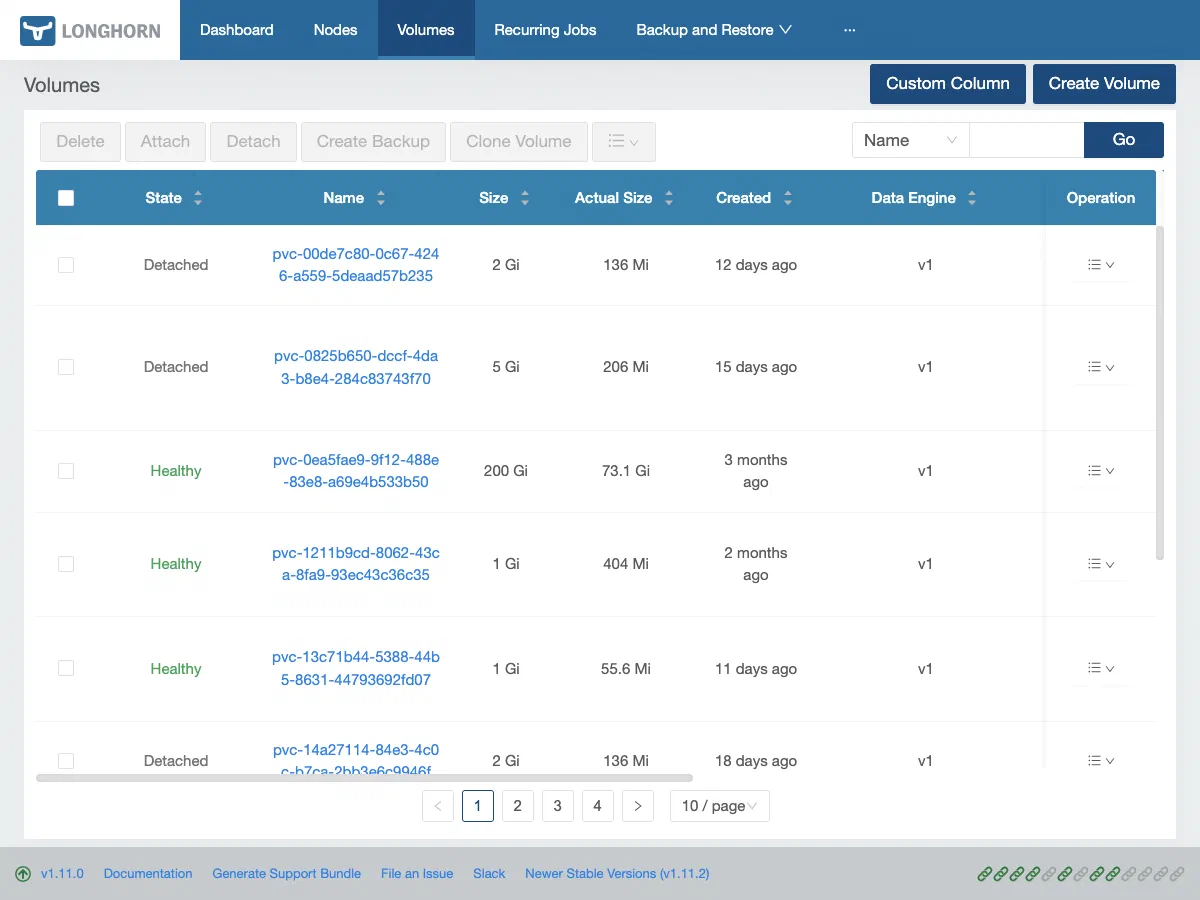
### Longhorn UI
The dashboard at ` http://192.168.55.201 ` gives a visual overview of volume health, replica distribution, node capacity, and backup status.
[](https://blog.derio.net/frank/docs/operating/02-storage-backups/longhorn-ui-volumes.png)
Longhorn UI Volume page: replica distribution and robustness at a glance
### Backup Jobs
Check the RecurringJob schedule and retention:
```bash
kubectl get recurringjobs.longhorn.io -n longhorn-system
```
Check the backup target status:
```bash
kubectl get backuptargets.longhorn.io -n longhorn-system
```
Expected output:
```
NAME URL CREDENTIAL AVAILABLE LASTSYNCEDAT
default s3://frank-longhorn-backups@auto/ longhorn-r2-secret true 2026-07-15T02:00:00Z
```
List recent backups for a specific volume. The label on a ` Backup ` is ` backup-volume `, and ` ` is the PV name (` pvc- `), not the PVC name:
```bash
kubectl get backups.longhorn.io -n longhorn-system \
-l backup-volume= \
--sort-by=.metadata.creationTimestamp
```
Do not reach for ` longhornvolume ` here out of habit. It is a real Longhorn label on ` replicas.longhorn.io `, ` engines.longhorn.io ` and ` snapshots.longhorn.io ` — all three verified live — and it is absent on ` Backup ` alone. So the habit is learned correctly on three kinds and is silently wrong on the fourth, where the bad selector returns ` No resources found `: the same output you would get if every backup were genuinely missing. The label set is per-kind, so confirm it against the kind you are querying rather than assuming it carries over:
```bash
kubectl get backups.longhorn.io -n longhorn-system -o json \
| jq '.items[0].metadata.labels'
```
### Node and Disk Status
```bash
kubectl get nodes.longhorn.io -n longhorn-system -o wide
```
This shows per-node scheduling state and disk capacity. Both Raspberry Pi nodes should show ` ALLOWSCHEDULING: false `.
## Routine Operations
### Expand a Volume
Longhorn supports online volume expansion. Edit the PVC (PersistentVolumeClaim) (**PersistentVolumeClaim**A Kubernetes request for durable storage. The pod names a claim and the storage layer — Longhorn on Frank — binds real disk behind it, so the data outlives the pod.) :
```bash
kubectl patch pvc -n \
-p '{"spec":{"resources":{"requests":{"storage":"20Gi"}}}}'
```
The underlying Longhorn volume and filesystem expand automatically. No pod restart needed for ext4. For XFS (X File System) (**X File System**A journalling filesystem that handles large files and parallel I/O well. One of the options underneath a Longhorn volume.) , run inside the pod:
```bash
xfs_growfs /
```
**“Automatically” assumes Longhorn accepts the request — and it may not.** Longhorn’s provisioning ceiling counts each replica’s *declared* size, not bytes written, so a node can be half-empty and still refuse to grow a volume:
```
size + StorageScheduled <= (StorageMax - StorageReserved) * overProvisioningPercentage%
```
When that clause fails, the API server still accepts the patch and ArgoCD still reports ` Synced ` — ` status.capacity.storage ` simply never changes. Measured 2026-07-27 while growing a 20Gi volume: two of its three replicas sat on nodes with 5Gi and **−4Gi** of headroom, while those disks were roughly 55% physically written.
So check headroom on the nodes hosting the replicas *before* expanding:
```bash
kubectl -n longhorn-system get nodes.longhorn.io -o json | jq -r '
.items[] | .metadata.name as $n |
(.status.diskStatus | to_entries[] |
"\($n) scheduled=\((.value.storageScheduled/1073741824)|floor)Gi " +
"max=\((.value.storageMaximum/1073741824)|floor)Gi")'
```
and verify afterwards against the artifact rather than the sync status:
```bash
kubectl -n get pvc -o jsonpath='{.status.capacity.storage}{"\n"}'
kubectl -n exec deploy/ -- df -h
```
Frank’s ceiling was raised from the chart default of 100% to 150% (` apps/longhorn/values.yaml `); the physical guard, ` storageMinimalAvailablePercentage: 15 `, is untouched and remains what actually prevents filling a disk. Full treatment of this failure mode in [Operating on Green](https://blog.derio.net/frank/docs/operating/30-silent-failure/).
### Trigger a Manual Backup
Before maintenance, take an immediate backup outside the scheduled window:
```bash
kubectl create -f - <
spec:
snapshotName: ""
EOF
```
Leaving ` snapshotName ` empty tells Longhorn to take a fresh snapshot and back it up. Track progress in the Longhorn UI under **Backup**.
### Restore a Volume from Backup
Via the Longhorn UI:
1. Open ` http://192.168.55.201 ` → **Backup**
2. Find the volume, select a recovery point (daily or weekly)
3. Click **Restore** — choose replica count and target StorageClass
4. Longhorn creates a new volume
Via CLI, create a new volume referencing the backup URL:
```bash
kubectl create -f - <
namespace: longhorn-system
spec:
fromBackup: "s3://frank-longhorn-backups@auto/?backup=&volume="
numberOfReplicas: 3
dataLocality: best-effort
EOF
```
Then create a PV (PersistentVolume) (**PersistentVolume**The actual piece of storage a PVC binds to. The claim is the request; the PV is what satisfies it.) and PVC pointing to the restored volume, or use the Longhorn UI to create the PVC automatically.
### Manage Snapshots
```bash
# List snapshots for a volume
kubectl get snapshots.longhorn.io -n longhorn-system \
-l longhornvolume=
# Delete old snapshots (Longhorn retains per RecurringJob retain count)
kubectl delete snapshot.longhorn.io -n longhorn-system
```
### Verify R2 Backup Credentials
If backups start failing:
```bash
kubectl get secret longhorn-r2-secret -n longhorn-system
kubectl get backuptargets.longhorn.io -n longhorn-system
```
If ` AVAILABLE ` is ` false `, the R2 credentials may be missing or invalid. Re-apply from the encrypted source:
```bash
sops --decrypt secrets/longhorn/r2-secret.yaml | kubectl apply -f -
```
## Runbook
### Volume Degraded
A degraded volume has fewer healthy replicas than requested.
```bash
# Check which replicas are unhealthy
kubectl get replicas.longhorn.io -n longhorn-system \
-l longhornvolume=
# Check node status — is a node offline?
kubectl get nodes
kubectl get nodes.longhorn.io -n longhorn-system
```
If a node is temporarily down (reboot, maintenance), Longhorn rebuilds the replica when the node returns. If a node is permanently gone, ` nodeDownPodDeletionPolicy: delete-both-statefulset-and-deployment-pod ` triggers auto-rebuild.
Force-rebuild a replica on a different node by deleting the failed replica:
```bash
kubectl delete replica.longhorn.io -n longhorn-system
```
Longhorn schedules a new replica on a healthy node automatically.
#### Recovery: IM memory wedge
If a node goes ` NotReady ` with memory pressure (Layer 1 alert ` layer-1-node-memory-headroom ` below 1 GiB), the Longhorn instance manager may have leaked memory. Known in v1.11.0 (` ~0.9 GiB/day `) — fixed in v1.11.1+. The recovery is a power-cycle (` docs/investigations/2026-06-04--stor--raspi-1-memory-wedge-incident.md `).
```bash
# Confirm no volumes are degraded first
kubectl get volumes.longhorn.io -n longhorn-system | grep -v healthy
# If all healthy, reboot the affected node
talosctl reboot --nodes
```
Do **not** force-delete VolumeAttachments — scale the workload to 0 and let natural detach happen. A force-delete mid-write can blow up ext4 journals.
### Backup Failed
Check the backup target availability first:
```bash
kubectl get backuptargets.longhorn.io -n longhorn-system -o yaml
```
Look at ` status.conditions ` — common failures:
- **Credential error**: R2 secret missing or wrong. Verify with ` kubectl get secret longhorn-r2-secret -n longhorn-system -o yaml ` and check that ` AWS_ACCESS_KEY_ID `, ` AWS_SECRET_ACCESS_KEY `, and ` AWS_ENDPOINTS ` are present.
- **Network error**: Check DNS resolution and outbound HTTPS connectivity from a Longhorn pod.
- **Bucket not found**: Verify the bucket name matches ` backupTargetURL `.
Check the Longhorn manager logs:
```bash
kubectl logs -n longhorn-system -l app=longhorn-manager --tail=50 | grep -i backup
```
#### Recovery: stale backups (Grafana alert)
The Layer 9 alert ` layer-9-backup-stale ` fires when ` daily-nas ` goes >48h or ` weekly-r2 ` >10d without success. To diagnose:
```bash
kubectl -n longhorn-system get jobs --sort-by=.status.startTime | tail -5
```
If the CronJob is healthy but individual backups fail, the BackupTarget may have drifted — check ArgoCD sync status on the ` longhorn-extras ` Application.
### Volume Stuck Attaching
A volume stuck in ` attaching ` state usually means iSCSI issues:
```bash
# Check the volume attachment status
kubectl describe volume.longhorn.io -n longhorn-system
# Check the engine status
kubectl get engines.longhorn.io -n longhorn-system \
-l longhornvolume= -o yaml
# Verify iSCSI is running on the target node
talosctl -n services | grep iscsid
# If iscsid is missing, check extensions
talosctl -n get extensions
```
If iSCSI is not running, the ` iscsi-tools ` Talos extension may have been lost during an upgrade.
#### Recovery: force-detach
As a last resort:
```bash
kubectl patch volume.longhorn.io -n longhorn-system \
--type merge -p '{"spec":{"nodeID":""}}'
```
This clears the node assignment and lets Longhorn re-attach the volume when the consuming pod is rescheduled. Do not force-delete the VolumeAttachment object — scale the workload to 0 and let the natural detach complete.
### Checking the HDD tier
```bash
source .env
kubectl -n longhorn-system get nodes.longhorn.io pc-1 -o yaml # hdd-* disks: Ready / Schedulable, tag hdd
kubectl -n longhorn-system get replicas.longhorn.io -o custom-columns=NAME:.metadata.name,NODE:.spec.nodeID,DISK:.spec.diskPath | grep /var/mnt/hdd-
kubectl -n longhorn-system get settings.longhorn.io allow-empty-disk-selector-volume # must read false
```
Drive health is not monitored by Longhorn itself: re-run the SMART check from the ` stor-pc1-hdd-smart-gate ` manual operation (` smartctl -H -A ` per drive from a privileged debug pod on pc-1). Reallocated (5), pending (197) or offline-uncorrectable (198) sectors rising above zero means the drive should be removed from ` 402-pc1-hdd-volumes.yaml ` and ` longhorn-node-disks-pc-1.yaml `.
### Draining pc-1
pc-1 holds the only replica of every ` longhorn-hdd ` volume, and of Gitea’s and the runner’s single-replica volumes. A plain drain works only because ` nodeDrainPolicy ` is ` allow-if-replica-is-stopped `: Longhorn releases the node once the drain has detached those volumes. Expect pc-1’s pinned services (Gitea, Zot, the act-runner, the pc-1-pinned Tekton pipelines) to be down until you uncordon.
```bash
source .env
kubectl -n longhorn-system get settings.longhorn.io node-drain-policy # must read allow-if-replica-is-stopped
kubectl drain pc-1 --ignore-daemonsets --delete-emptydir-data --timeout=10m
talosctl -n 192.168.55.71 reboot # NOT `talosctl reboot --drain` (PermissionDenied through the Omni proxy)
kubectl get node pc-1 -w # wait for Ready
talosctl -n 192.168.55.71 get volumestatus | grep hdd- # the hdd volume must be ready again
kubectl uncordon pc-1
```
If the drain loops on ` Cannot evict pod ... disruption budget ` for an ` instance-manager-* ` pod, a sole replica is still attached: find which volume, or check the setting was not reverted. Never leave pc-1 cordoned while you investigate. Run ` kubectl uncordon pc-1 ` first; the drain can wait.
## Missteps
| What we assumed | Why it was wrong | What it cost |
| --- | --- | --- |
| Both daily and weekly backups can use separate targets (NFS + R2) | Longhorn ` v1beta2 ` RecurringJob CRD (CustomResourceDefinition) (**CustomResourceDefinition**The object that teaches the Kubernetes API a new resource type. Install a CRD and the API server starts serving a kind it has never heard of, with validation and RBAC like any built-in.) has no ` backupTargetName ` field — only ` concurrency, cron, groups, labels, name, parameters, retain, task ` (#11392 closed without fix) | Both jobs route to single R2 target. NFS BackupTarget exists in the repo but is commented out (` apps/longhorn/manifests/backup-target-nas.yaml `). |
| NFS backup target works | Longhorn 1.11 generates ` host/path ` instead of ` host:/path ` for NFS (bug #11412) | NFS target disabled until v1.13 fix. |
| ArgoCD can manage the R2 backup secret through SSA (Server-Side Apply) (**Server-Side Apply**Kubernetes applying changes field by field, with each manager owning the fields it sets. Frank uses it everywhere — without it, large resources blow the annotation size limit the old client-side path depends on.) | SOPS (Secrets OPerationS) (**Secrets OPerationS**Mozilla's tool for encrypting the *values* in a YAML file while leaving the keys readable, so an encrypted secret still reviews as a sensible diff.) ` .sops ` metadata fields are rejected by ArgoCD’s server-side apply — Secret goes OutOfSync immediately | R2 secret lives outside the manifests path, applied out-of-band via ` sops --decrypt \| kubectl apply -f - ` (` docs/runbooks/frank-gotchas/storage-secrets-ssa.md `). |
| Longhorn v1.11.0 is stable | Instance Manager anonymous heap leaks ~0.9 GiB/day (` docs/investigations/2026-06-04--stor--raspi-1-memory-wedge-incident.md `) | raspi-1 wedged at 8 GiB RAM — power-cycle recovery. Pinned to v1.11.2. |
| The HDD tier’s pre-merge steps would run before the merge | The PR merged first, so ` longhorn-hdd ` and the CI repoint went live with no ` hdd ` disk behind them; every new workspace PVC failed with ` specified disk tag hdd does not exist ` | CI stalled about 8.5 h (2026-10-11 21:22 → 10-12 05:53, 23 PipelineRuns timed out) until the SMART gate cleared sdb and its disk came online |
| ` kubectl drain pc-1 ` would work like any other node | Longhorn’s default ` node-drain-policy ` blocks while a node holds the last replica of any volume, detached or not, and pc-1 always does | First drain timed out after 15 min with pc-1 cordoned: Gitea/Zot/CI down ~82 min. Fixed by declaring ` allow-if-replica-is-stopped ` |
| Volume health alerting is automatic | No ServiceMonitor scrapes Longhorn metrics — ` longhorn_volume_robustness ` is not surfaced | Fallback is ` kube_pod_status_ready ` on longhorn-manager pods. Alert rule exists but covers only pod liveness. |
## Quick Reference
| Task | Command |
| --- | --- |
| List volumes | ` kubectl get volumes.longhorn.io -n longhorn-system ` |
| Volume detail | ` kubectl describe volume.longhorn.io -n longhorn-system ` |
| List replicas | ` kubectl get replicas.longhorn.io -n longhorn-system -l longhornvolume= ` |
| List backups | ` kubectl get backups.longhorn.io -n longhorn-system ` |
| Backup target status | ` kubectl get backuptargets.longhorn.io -n longhorn-system ` |
| Recurring jobs | ` kubectl get recurringjobs.longhorn.io -n longhorn-system ` |
| List snapshots | ` kubectl get snapshots.longhorn.io -n longhorn-system -l longhornvolume= ` |
| Expand PVC | ` kubectl patch pvc -n -p '{"spec":{"resources":{"requests":{"storage":""}}}}' ` |
| Re-apply R2 secret | ` sops --decrypt secrets/longhorn/r2-secret.yaml \| kubectl apply -f - ` |
| Longhorn manager logs | ` kubectl logs -n longhorn-system -l app=longhorn-manager --tail=50 ` |
| Node disk capacity | ` kubectl get nodes.longhorn.io -n longhorn-system -o wide ` |
| Check Longhorn StorageClasses | ` kubectl get storageclass \| grep longhorn ` |
| Trigger manual backup | ` kubectl create -f manual-backup.yaml ` (see Routine Operations) |
| Restore from backup (CLI) | ` kubectl create -f restored-volume.yaml ` (see Routine Operations) |
| Force-detach stuck volume | ` kubectl patch volume.longhorn.io -n longhorn-system --type merge -p '{"spec":{"nodeID":""}}' ` |
| Longhorn UI | ` http://192.168.55.201 ` |
## Explanation
This post covers the Longhorn operations that keep Frank’s data alive — volume health checks, backup management, and recovery from the failures that have actually bitten us (IM memory wedges, stuck attachments, stale backups). The building companion posts cover *why* we chose Longhorn and this backup architecture; this post is what you reach for when a volume degrades or a backup alert fires.
The design intention was for daily backups to go to NFS and weekly to R2, but Longhorn 1.11’s NFS bug and the absent ` backupTargetName ` CRD field forced both onto R2. The NFS BackupTarget manifest is preserved commented out in the repo (` apps/longhorn/manifests/backup-target-nas.yaml `) for when the fix lands.
## References
- [Longhorn Documentation](https://longhorn.io/docs/1.8.1/) — official docs including snapshot, backup, and restore guides
- [Cloudflare R2 Documentation](https://developers.cloudflare.com/r2/) — bucket management, API tokens, S3 compatibility
- [Building: Persistent Storage with Longhorn](https://blog.derio.net/frank/docs/building/03-storage/) — how storage was set up on Frank
- [Building: Backup — Longhorn to R2](https://blog.derio.net/frank/docs/building/08-backup/) — backup architecture and Longhorn 1.11 gotchas
- [Frank Gotchas — Storage/Secrets](https://github.com/derio-net/frank/blob/main/docs/runbooks/frank-gotchas/storage-secrets-ssa.md) — IM leak, SSA/SOPS gotchas
- [Incident: raspi-1 Memory Wedge](https://github.com/derio-net/frank/blob/main/docs/investigations/2026-06-04--stor--raspi-1-memory-wedge-incident.md) — IM leak forensics and recovery