
Operating on Secrets
Last updated 2026-07-15 ·a77bf48
This is the operational companion to Building Secrets Management. That post covers the architecture decisions and the three chart bugs that nearly sank the deployment. This one covers what you actually type when an ExternalSecret shows SecretSyncedError, a rotated credential isn’t picked up, or a Secrets OPerationSMozilla's tool for encrypting the *values* in a YAML file while leaving the keys readable, so an encrypted secret still reviews as a sensible diff. file refuses to decrypt — plus the gotchas we discovered the hard way.
Before any of the commands below, source the environment:
source .env          # sets KUBECONFIG, TALOSCONFIG
source .env_devops   # sets OMNICONFIG + service accounts
What Healthy Looks Like
Secrets on Frank flow through two layers:
Runtime secrets live in Infisical. Applications never touch them directly. External Secrets Operator watches ExternalSecret resources, fetches values from Infisical via the ClusterSecretStore, and materializes them as native Kubernetes Secrets. The default refresh interval is 5 minutes.
Bootstrap secrets are the credentials Infisical and External Secrets OperatorThe operator that pulls secrets from an external store into Kubernetes Secrets. On Frank it mints short-lived GitHub App tokens, so no long-lived credential is ever committed. themselves need to start — database passwords, Redis passwords, Machine Identity credentials. These are SOPS-encrypted with age, stored in secrets/, and applied manually. They exist outside ArgoCD because ArgoCD cannot decrypt SOPS secrets during ServerSideApply.
The rule: if a secret is needed before Infisical is running, it’s a SOPS bootstrap secret. Everything else goes into Infisical.
A healthy secrets layer means every ExternalSecret in every namespace shows STATUS: SecretSynced and READY: True:
kubectl get externalsecrets -A$ kubectl get externalsecrets -A
NAMESPACE NAME STORE REFRESH INTERVAL STATUS READY
agents vk-remote-secrets infisical 5m SecretSynced True
gitea gitea-secrets infisical 5m SecretSynced True
monitoring grafana-alerting-secrets infisical 5m SecretSynced True
paperclip-system paperclip-anthropic infisical 5m SecretSynced True
paperclip-system paperclip-auth infisical 5m SecretSynced True
tekton-pipelines cosign-key infisical 5m SecretSynced True
zot zot-secrets infisical 5m SecretSynced True
And the ClusterSecretStore shows READY: True:
kubectl get clustersecretstore
    graph TD
  subgraph BOOT["Bootstrap Layer"]
    S1["SOPS-encrypted<br/>secrets/ files"]
    S1 -->|"sops --decrypt"| INF["Infisical<br/>192.168.55.204:8080"]
  end
  subgraph RUNTIME["Runtime Layer"]
    INF -->|"Machine Identity"| ESO["ESO<br/>ClusterSecretStore"]
    ESO --> ES["ExternalSecret<br/>CR"]
    ES --> KS["K8s Secret"]
    KS -->|"envFrom"| POD["Pod"]
  end
  subgraph USER["User Workflow"]
    U["Operator"] -->|"Infisical UI"| INF
    U -->|"sops --decrypt \| kubectl apply"| BS["Bootstrap Secret<br/>(SOPS)"]
  end
Verify
ESO Sync Status
Inspect a specific ExternalSecret for detailed sync history:
kubectl describe externalsecret <name> -n <namespace>The Events section shows recent sync attempts and any error messages. If an ExternalSecret shows SecretSyncedError, the first place to look is the Events output.
ClusterSecretStore Health
The ClusterSecretStore is the single connection point between ESO and Infisical. If it is unhealthy, no secrets sync:
kubectl describe clustersecretstore infisicalLook for Ready: True and Status: Valid. Errors here mean the Infisical API is unreachable or the Machine Identity credentials are wrong.
Infisical UI
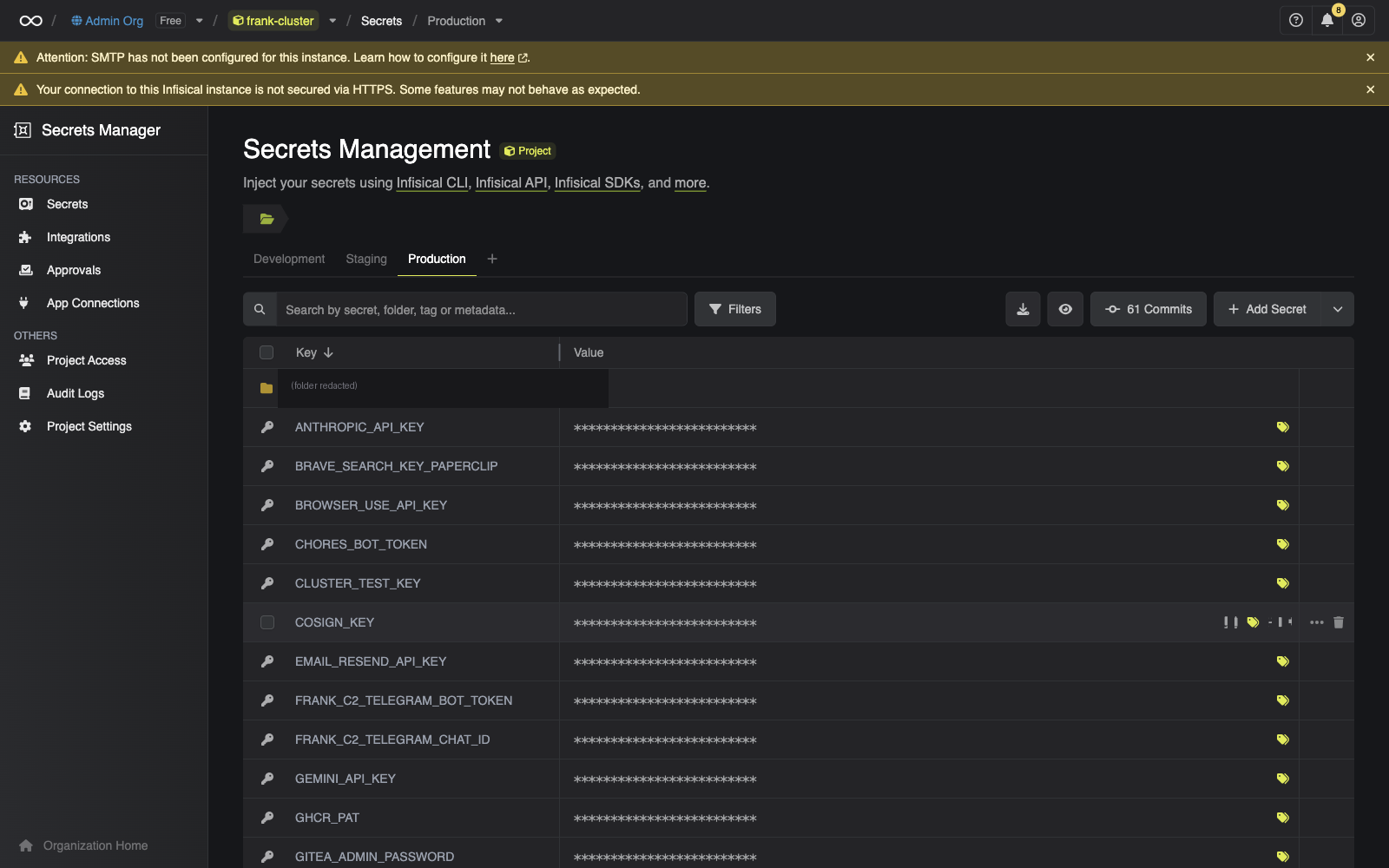
The Infisical dashboard at http://192.168.55.204:8080 shows all secrets in the frank-cluster project, organized by environment. The audit log (Project Settings) records who changed what and when — the fastest way to verify a secret’s current value or check rotation history.
Steps
Adding a New Secret
- Go to the Infisical UI, navigate to the
frank-clusterproject,prodenvironment - Add the key-value pair
- Create an
ExternalSecretmanifest in the consuming app’s manifests directory:
apiVersion: external-secrets.io/v1
kind: ExternalSecret
metadata:
  name: my-app-secrets
  namespace: my-app
spec:
  refreshInterval: 5m
  secretStoreRef:
    name: infisical
    kind: ClusterSecretStore
  target:
    name: my-app-secrets
  data:
    - secretKey: MY_SECRET_KEY
      remoteRef:
        key: MY_SECRET_KEY
        conversionStrategy: Default
        decodingStrategy: None
        metadataPolicy: None
We always set conversionStrategy, decodingStrategy, and metadataPolicy explicitly now — omitting them caused perpetual ArgoCD OutOfSync because the CustomResourceDefinitionThe object that teaches the Kubernetes API a new resource type. Install a CRD and the API server starts serving a kind it has never heard of, with validation and RBAC like any built-in. defaults them on the live object but git had no value (commit ea842e7b).
- Commit and push — ArgoCD syncs the ExternalSecret, ESO fetches the value from Infisical.
Rotating a Secret
Update the value in the Infisical UI. ESO picks up the change on the next refresh cycle (typically 5m). If the consuming pod reads secrets from environment variables — not files — it needs a restart to see the new value:
kubectl rollout restart deployment/<app> -n <namespace>If you can’t wait for the refresh interval, force an immediate sync:
kubectl annotate externalsecret <name> -n <namespace> \
  force-sync=$(date +%s) --overwrite
Applying SOPS Bootstrap Secrets
Bootstrap secrets are applied manually whenever they change or after a fresh cluster build:
sops --decrypt secrets/infisical/infisical-secrets.yaml | kubectl apply -f -
sops --decrypt secrets/infisical/eso-credentials.yaml | kubectl apply -f -
To verify a SOPS-encrypted file decrypts correctly without applying:
sops --decrypt secrets/infisical/infisical-secrets.yamlRecover
ESO Sync Failed (SecretSyncedError)
If an ExternalSecret shows SecretSyncedError:
Check the ClusterSecretStore — one unhealthy store breaks all syncs:
kubectl get clustersecretstore
kubectl describe clustersecretstore infisical
Check the ESO controller logs for API errors:
kubectl logs -n external-secrets deployment/external-secrets --tail=50Verify Infisical is reachable from the cluster:
kubectl run curl-test --rm -it --image=curlimages/curl -- \
  curl -s http://192.168.55.204:8080/api/status
Check the Machine Identity credentials — the
infisical-credentialsSecret in theexternal-secretsnamespace must contain validclientIdandclientSecret:kubectl get secret infisical-credentials -n external-secrets -o yaml
The Project Slug Problem
If the ClusterSecretStore returns 404 errors, the project slug is wrong. Infisical auto-generates a URL-safe slug that differs from the display name — frank-cluster is the display name, but the actual slug is frank-cluster-iwpg.
We hit this during the initial deployment (commits aefa7916 / b228e2b5). The eso-cluster-reader Machine Identity has only the Viewer role, which cannot list workspaces via the API — so there’s no way to discover the slug programmatically. It must be read from the Infisical UI (Project Settings → General tab) and committed.
If you’re setting up a new Infisical project and the slug is unknown, give the identity a higher role temporarily, call GET /api/v1/workspace, read the slug, then restore the Viewer role.
The slug lives in apps/infisical/manifests/cluster-secret-store.yaml:
spec:
  provider:
    infisical:
      auth:
        universalAuthCredentials:
          clientId:
            secretRef:
              ...
          clientSecret:
            secretRef:
              ...
      projectSlug: frank-cluster-iwpg
      environmentSlug: prod
      secretsPath: /
Secret Not Updating After Rotation
If you changed a value in Infisical but the Kubernetes Secret still has the old value:
Check the refresh interval — the default is 5m, but Tekton’s ExternalSecrets use 1h:
kubectl get externalsecret <name> -n <namespace> -o yaml | grep refreshIntervalForce a sync to rule out timing:
kubectl annotate externalsecret <name> -n <namespace> \
  force-sync=$(date +%s) --overwrite
Check whether the pod needs a restart — env vars are read at startup, not live-reloaded:
kubectl rollout restart deployment/<app> -n <namespace>
Pod Blocked at CreateContainerConfigError
If a pod is stuck at CreateContainerConfigError and the ESO sync looks healthy, check whether the pod’s envFrom references a secret key that doesn’t exist in Infisical. A non-optional envFrom blocks the pod from starting when the referenced key is missing.
We hit this with the alert-agent (commit eb8328a2): OBS_GOATCOUNTER_API_TOKEN was never seeded into Infisical, so the 404 on the ExternalSecret fetch blocked the entire pod — including the Telegram secrets that were present. The fix was to split GoatCounter into its own ExternalSecret and mark all envFrom as optional: true.
To check:
kubectl describe pod <name> -n <namespace>Look for CreateContainerConfigError in the Conditions or Events. If an ExternalSecret exists but its target Secret is missing keys, the envFrom will fail:
kubectl get secret <name> -n <namespace> -o yaml | head -20SOPS Decrypt Errors
If sops --decrypt fails with an age-related error:
Check that the age key is available — SOPS looks in
$SOPS_AGE_KEY_FILEor~/.config/sops/age/keys.txt:echo $SOPS_AGE_KEY_FILE ls -la ~/.config/sops/age/keys.txtVerify the
.sops.yamlconfig points to the correct age public key:cat .sops.yamlCheck that the file was encrypted for the right key — the age recipient in the file header must match your key:
head -5 secrets/infisical/infisical-secrets.yaml
The Frank cluster uses a single age key age1ufxvcn4us3cue5dglwn4uk8ctjfpuaw6dqlwu4hjzszf2g4htpcqkszjne defined in .sops.yaml. It has never been rotated.
ESO Generator Ignores secretRef.Namespace
If you’re using an ESO GithubAccessToken generator (or any ClusterGenerator) and it fails to find its private key:
ESO v2.1.0 resolves the ClusterGenerator’s secretRef in the consuming ExternalSecret’s namespace, ignoring the namespace field in the secret reference. If the private key Secret lives in external-secrets but the ExternalSecret consuming it is in secure-agent-pod, the generator fails.
The fix (commit eb5fa217) is to move the SOPS-encrypted key Secret to the consuming namespace and drop the misleading namespace field. Force a re-sync afterward:
kubectl annotate externalsecret <name> -n <namespace> \
  force-sync=$(date +%s) --overwrite
This clears the cached generatorState and triggers a fresh generation.
Missteps
| What we assumed | Why it was wrong | What it cost |
|---|---|---|
| The Infisical project display name is the same as its API slug | Infisical auto-generates a URL-safe slug (frank-cluster-iwpg) from the display name (frank-cluster). The Viewer-scoped Machine Identity can’t list workspaces to discover it. | ~33 minutes of 404 debugging across 3 sequential fix commits. |
| Omitting defaults from an ExternalSecret manifest keeps it clean | CRDs apply default values for conversionStrategy, decodingStrategy, and metadataPolicy on the live object. Without them in git, ArgoCD detects perpetual drift and shows OutOfSync. | Every ExternalSecret perpetually OutOfSync until the fix. |
| A missing secret key in Infisical would fail gracefully — the pod would start without that one env var | ESO creates the target Secret with only the keys that exist in Infisical. A non-optional envFrom referencing the Secret blocks the pod at CreateContainerConfigError — including the keys that are present. | The alert-agent pod was wedged, blocking Telegram credential delivery, during an active incident. |
secretRef.namespace in an ESO generator applies to the secret’s location | ESO v2.1.0 resolves the ClusterGenerator’s secret reference in the consuming ExternalSecret’s namespace, ignoring the namespace field entirely. | Generator silently failed; had to move the private key Secret to the consumer namespace. |
Quick Reference
| Command | What It Does |
|---|---|
kubectl get externalsecrets -A | Show all ExternalSecrets and their sync status |
kubectl describe externalsecret <name> -n <ns> | Detailed sync status with events |
kubectl get clustersecretstore | ClusterSecretStore health check |
kubectl describe clustersecretstore infisical | Detailed store status and errors |
kubectl annotate es <name> -n <ns> force-sync=$(date +%s) --overwrite | Force immediate ESO sync |
kubectl rollout restart deployment/<app> -n <ns> | Restart pods to pick up rotated secrets |
kubectl logs -n external-secrets deployment/external-secrets --tail=50 | ESO controller logs |
sops --decrypt <file> | kubectl apply -f - | Apply a SOPS-encrypted bootstrap secret |
sops --decrypt <file> | Verify SOPS decryption without applying |
References
- Infisical Documentation — Self-hosted setup, Machine Identities, audit logs
- External Secrets Operator Documentation — ClusterSecretStore, ExternalSecret v1 API
- ESO Infisical Provider — Provider-specific configuration and auth
- SOPS Documentation — age encryption,
.sops.yamlconfiguration - Secrets Management — Infisical + ESO — Building post covering architecture and deployment